
HAVN — Private portfolio review
PRIVATE REVIEW ONLY · 29 ORIGINAL, UNREDACTED SCREENSHOTS · NOT PREPARED FOR PUBLICATION
Original vision / Jean-Christophe Bougnet

The work
behind

Book the artists. Plan the crew. Build the campaign. Run the door and the bar. Follow the money. HAVN brings these jobs into a family of focused apps—with a portal, a shared directory and its own hosting platform.

Get started ↗

I conceived HAVN as one ecosystem: the tools, the people who use them, and the platform behind them.
Jean-Christophe Bougnet · original product vision

15 app & platform surfaces inspected29 original captures2 public-scope entries
01 / Organise

Book the artist. Prepare the show.

Artist rosters, booking desks, advancing queues and crew planning. The work that puts the show together.

02 / Operate

Reach the audience. Run the night.

Visual campaigns, ticket inventory, venue operations and event finances. Distinct tools for the moments that count.

03 / Create & deliver

Make the visuals. Deliver the software.

A live visual instrument, an AI workspace and the platform behind the app family. Creation and delivery within the same vision.

Clients

More to come soon
OFF CLUB
LINK Festival
Groupe Solvay
Operations / DIRECTLY INSPECTED

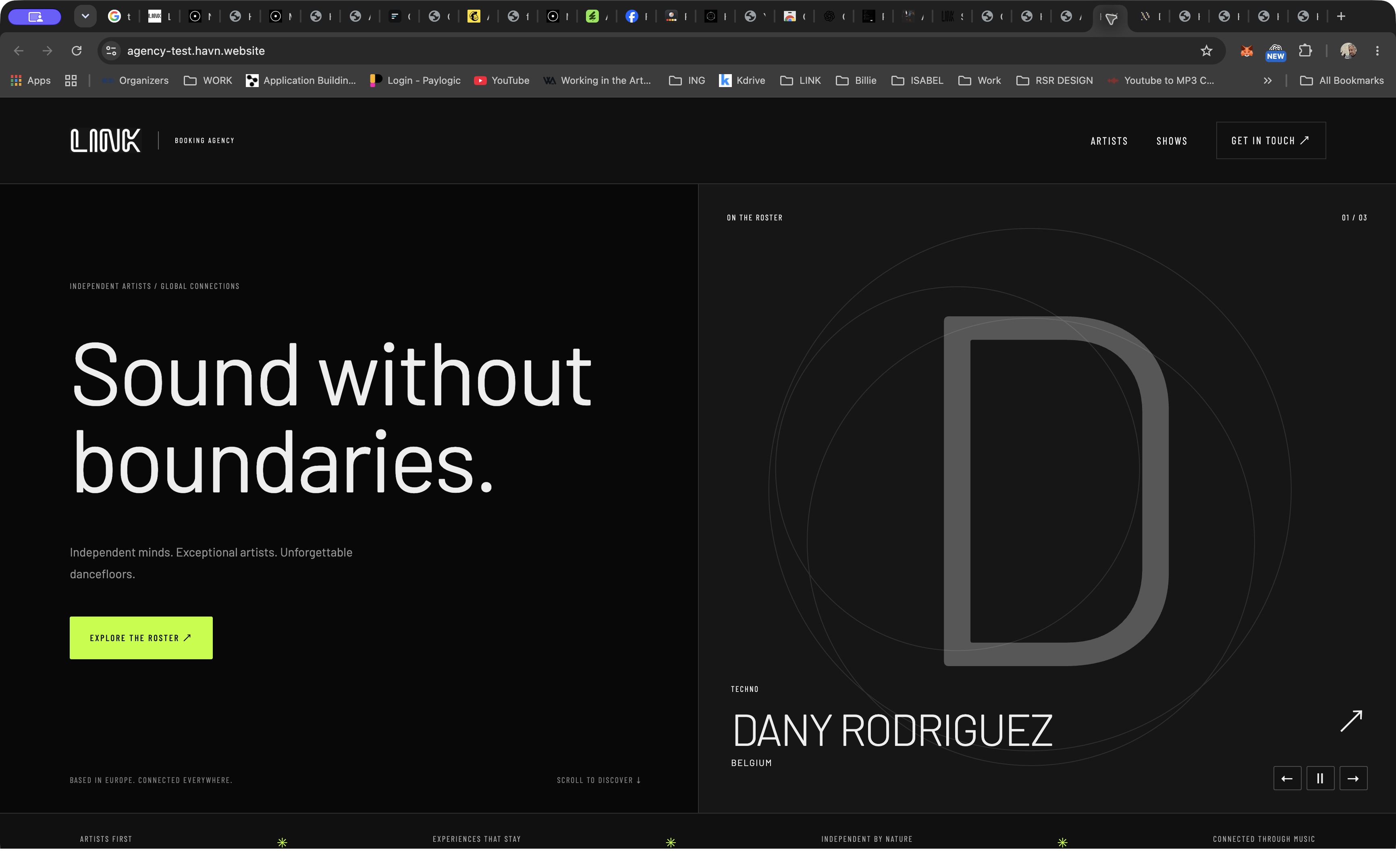
Agency / booking / artists mgmt

Put your artists in front. Keep the booking desk behind them.
Who it’s for

Artist agent, agency owner and promoter.

A public artist roster and a private booking desk need to tell the same story without exposing commercial information.

The workflow

  1. A promoter explores the public roster and artist pages.
  2. They send an enquiry with an artist, date and venue.
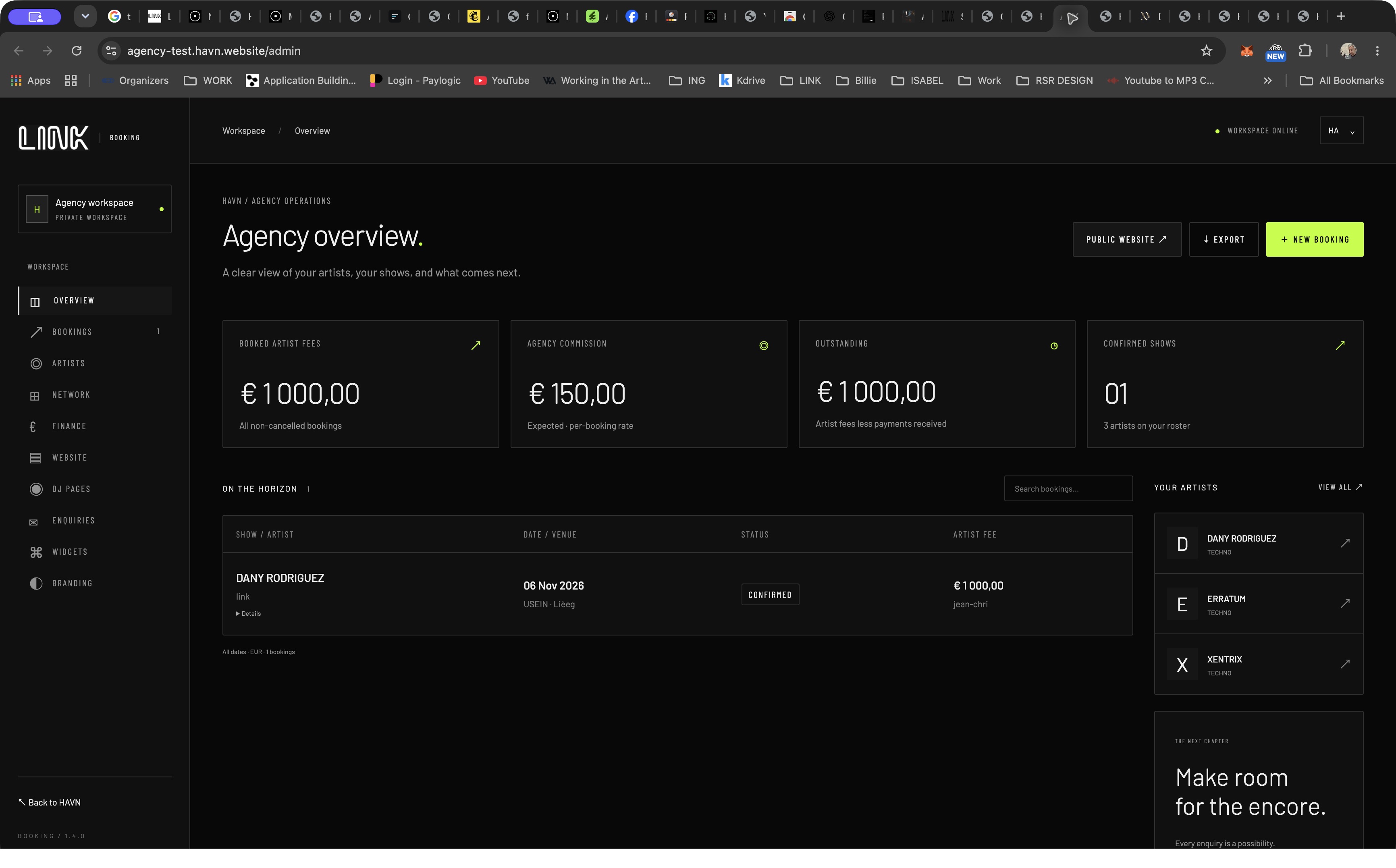
  3. The agency manages the booking, network and finance in its private workspace.

Why it matters

Connect a public discovery experience with a separate operational workspace, keeping the artist and show as the organising concepts.

A public artist roster, enquiry form and private workspace for shows, fees and commissions.

Get started ↗
Evidence & limits

Public roster and enquiry form inspected; private overview shows bookings, roster, artist fees, commission and outstanding amounts.

No enquiry submitted or booking changed. Existing amounts are private context, not verified commercial results.
Operations / DIRECTLY INSPECTED

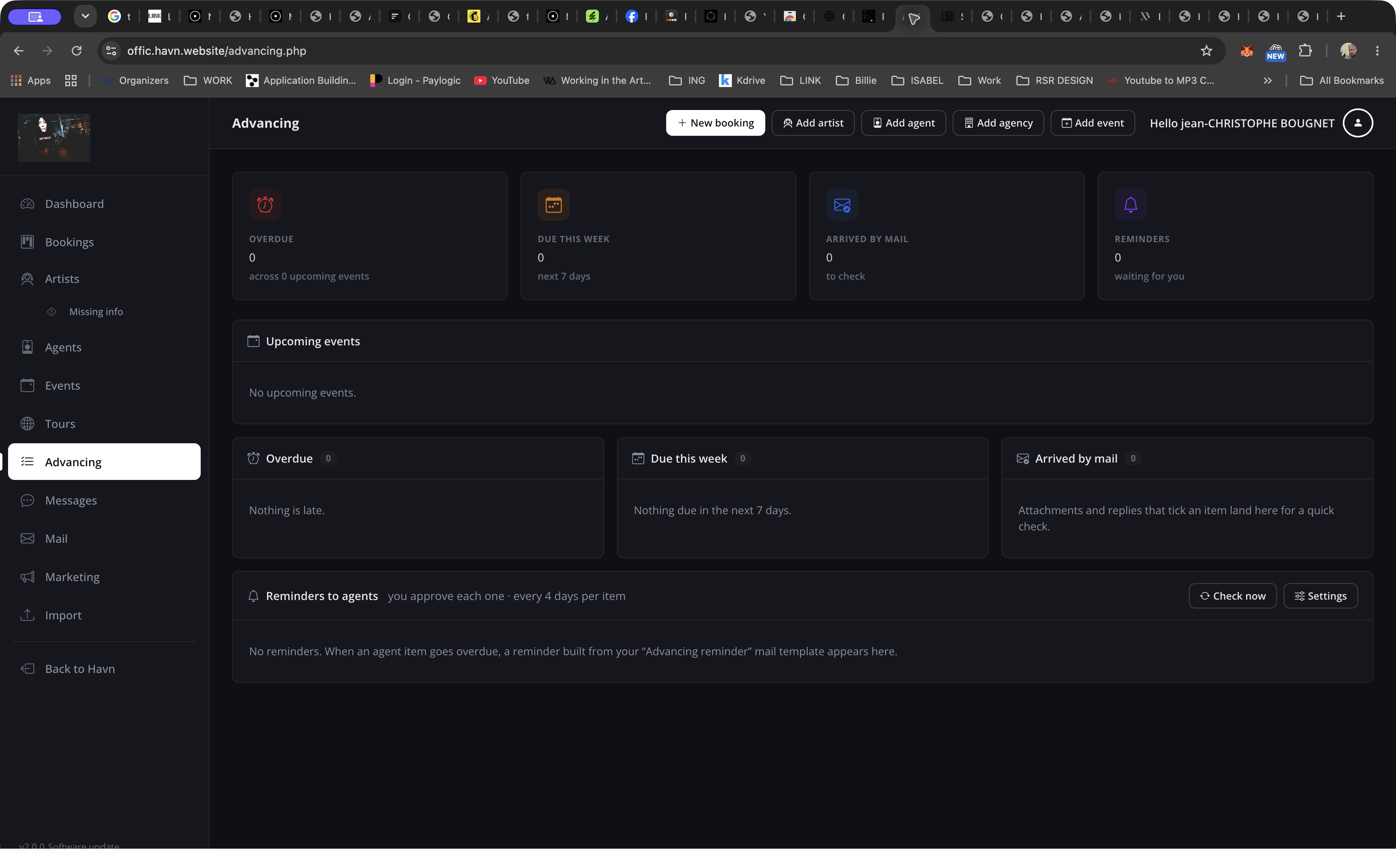
Office / promoter & advancing

Every booking has a next step.

Who it’s for

Promoter, booking coordinator and artist liaison.

Contracts, correspondence and artist logistics are easy to lose when each lives in a separate inbox or spreadsheet.

The workflow

  1. Track an artist and booking through the pipeline.
  2. Organise events, tours, agents, messages and mail around the work.
  3. Use advancing to review overdue requirements, incoming information and reminders.

Why it matters

Make missing information visible as a work queue rather than requiring staff to inspect every booking.

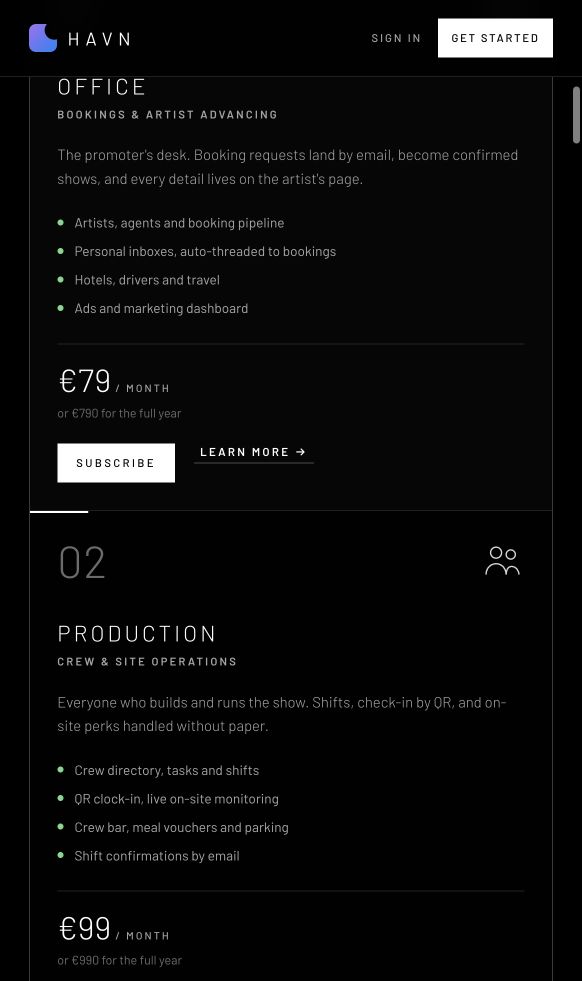
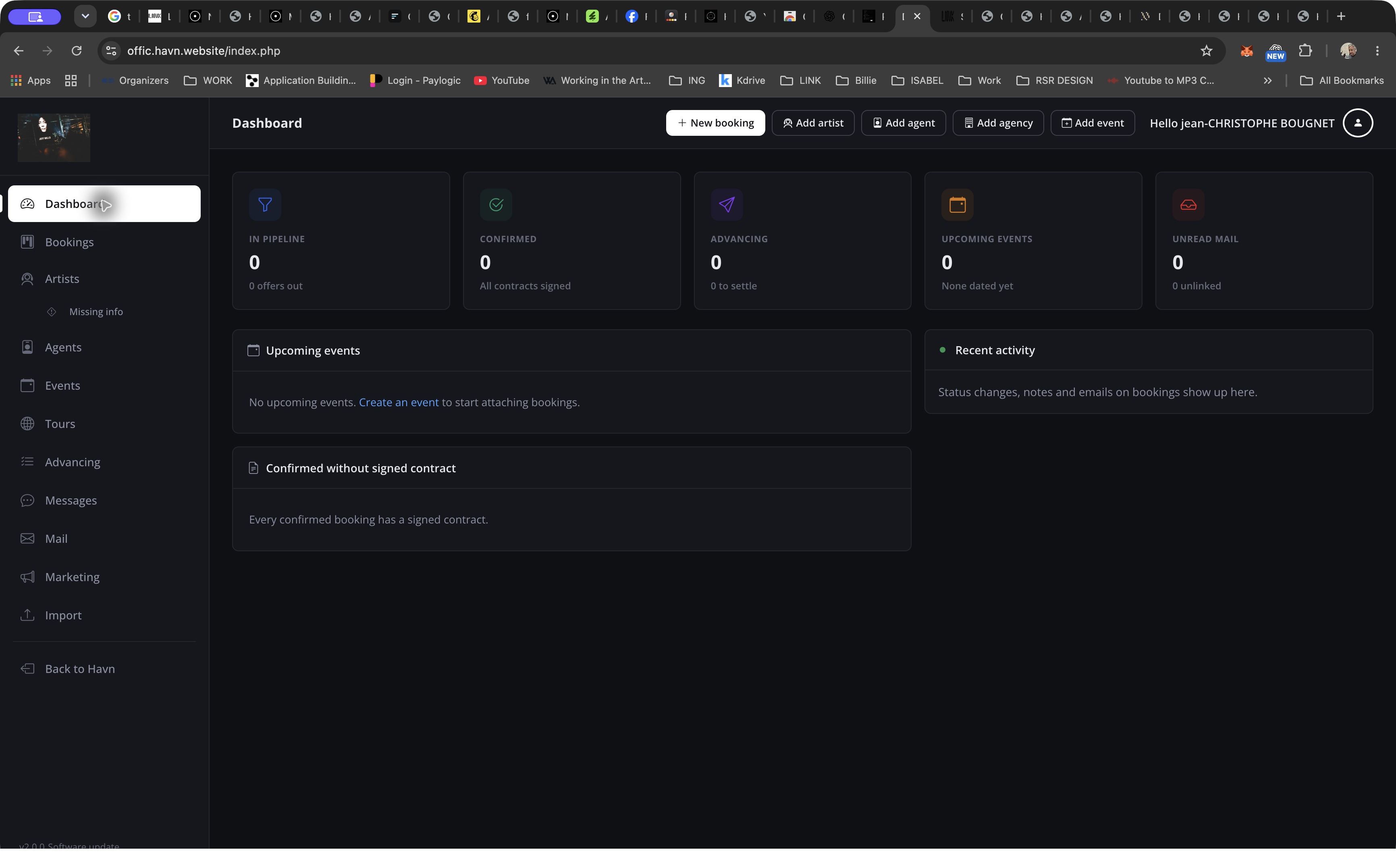
The booking pipeline, artist records, correspondence and advancing queues sit within the promoter’s workspace.

Get started ↗
Evidence & limits

Dashboard and Advancing inspected. Navigation includes Bookings, Artists, Missing info, Agents, Events, Tours, Messages, Mail and Marketing.

This tenant is empty. Mail delivery, reminder execution and completed booking workflows were not tested.

Operations / DIRECTLY INSPECTED

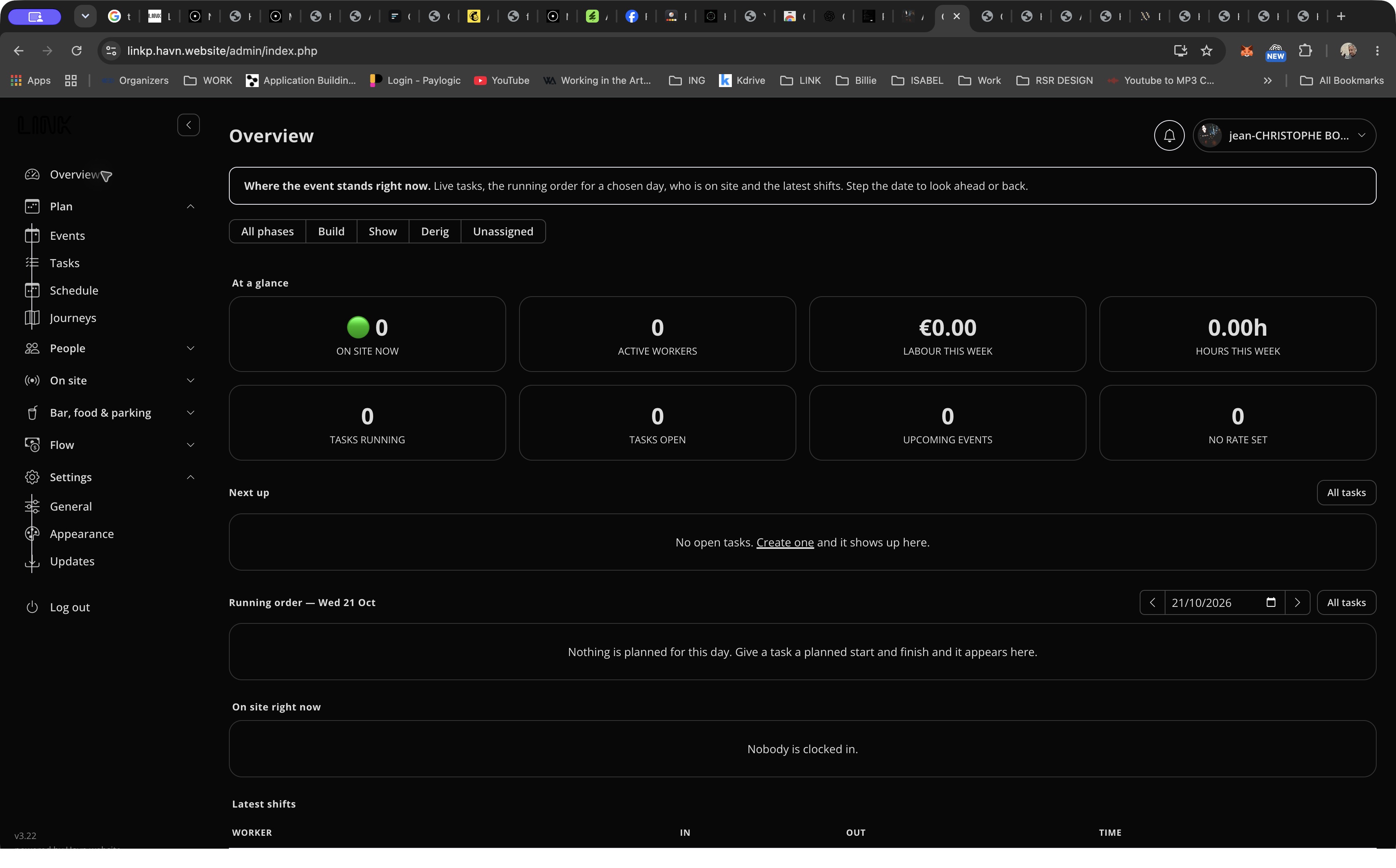
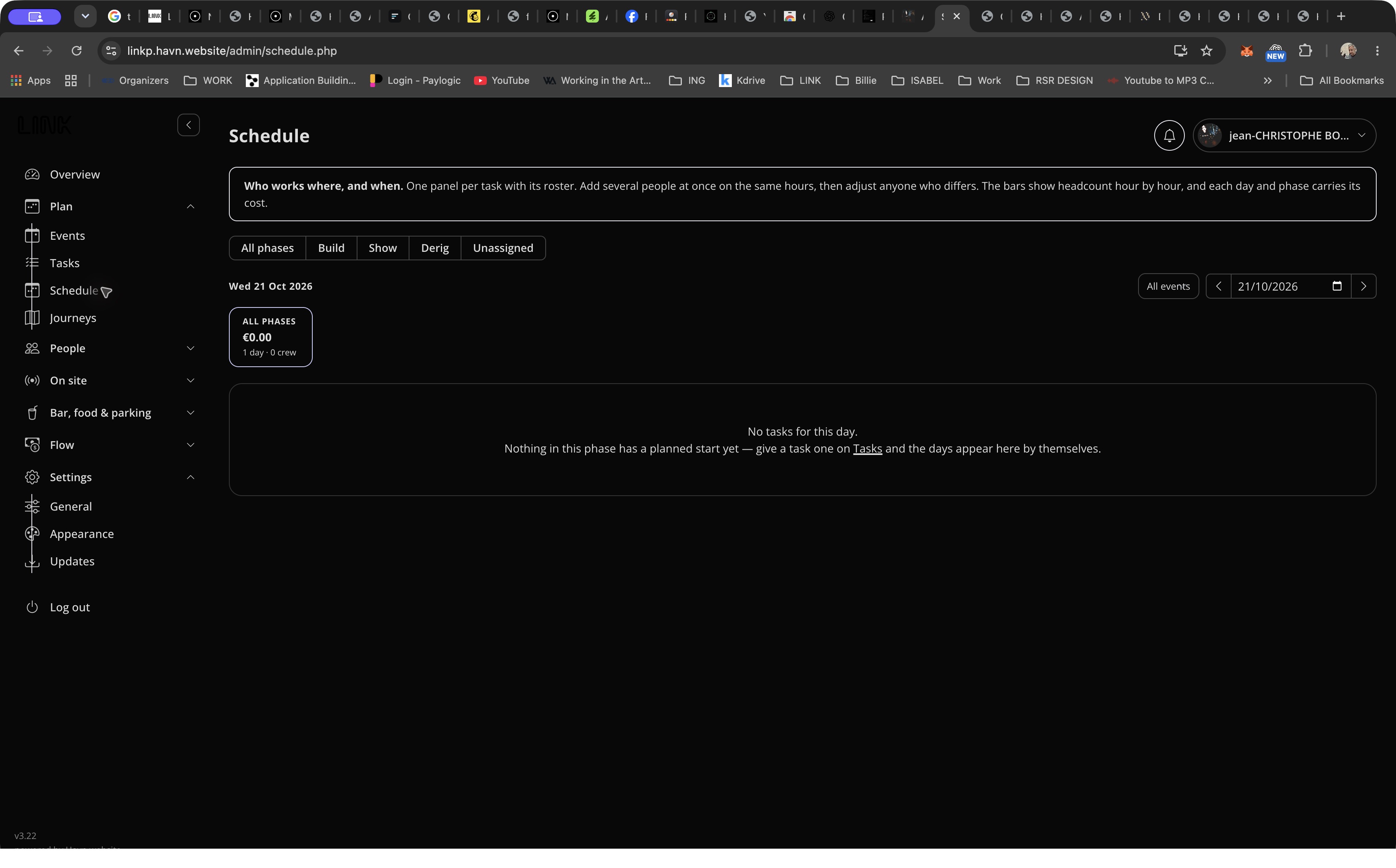
Production mgmt

Build. Show. Derig. Know who belongs where.

Who it’s for

Production manager, crew coordinator and site lead.

Build, show and derig involve changing teams, overlapping tasks and costs that need to stay understandable.

The workflow

  1. Separate the work into build, show, derig or unassigned phases.
  2. Plan tasks and their rosters for the selected day.
  3. Review running order, presence, hours and labour indicators from the overview.

Why it matters

Use phases and dates as navigation, with task-based rosters and headcount/cost views described by the scheduling screen.

Phase filters, task rosters, running orders and labour indicators give production planning a common structure.

Get started ↗
Evidence & limits

Overview and Schedule inspected. Menus expose Plan, People, On site, Bar/food/parking and Flow.

The captured tenant has no crew or tasks. No clock-in, roster change, notification or cost calculation was exercised.

Operations / DIRECTLY INSPECTED

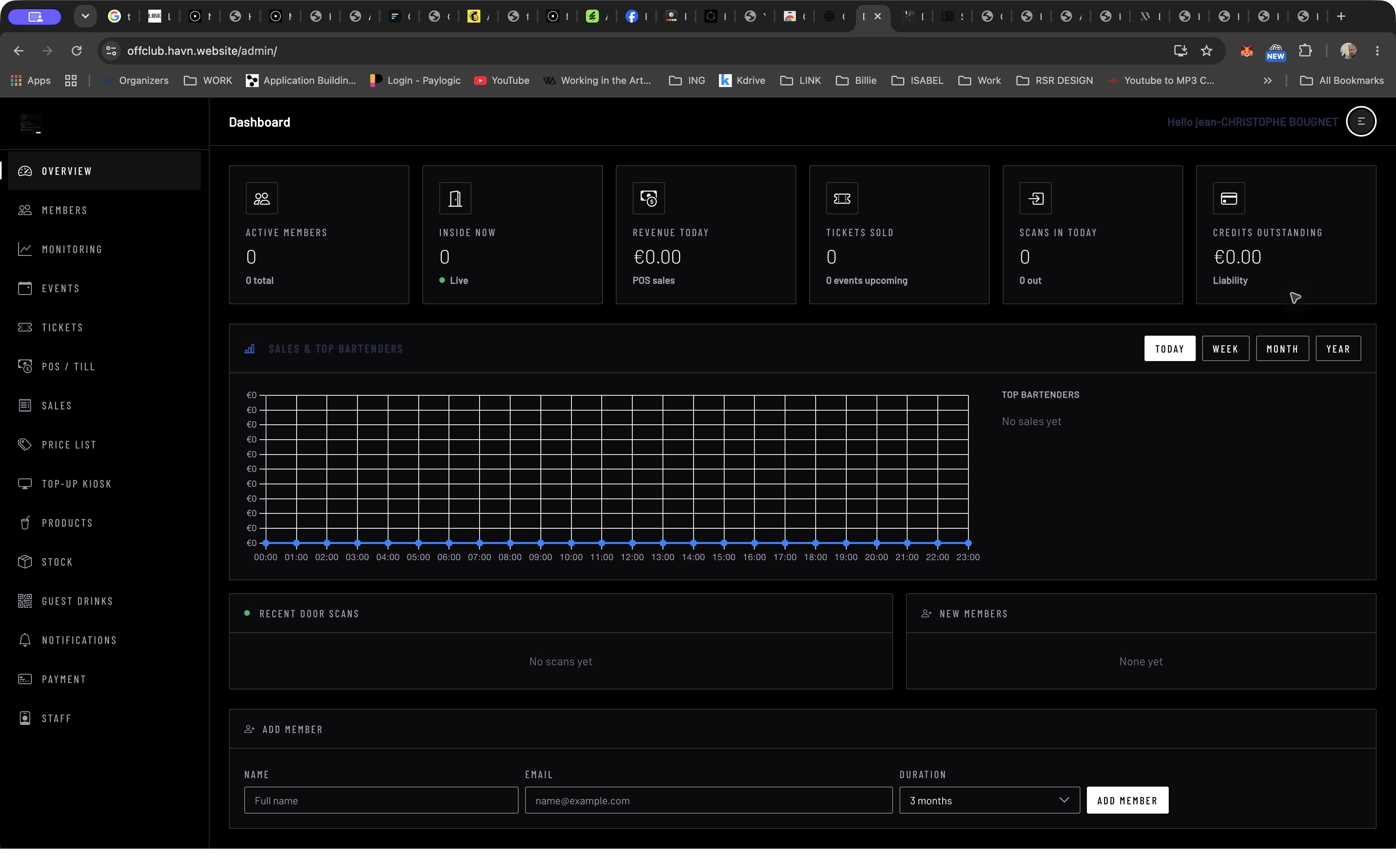
Event / club / festival

The door. The bar. The night’s numbers.

Who it’s for

Venue manager, bartender and door staff.

Membership, entry, bar sales and stock are closely related tasks, often managed with unrelated tools.

The workflow

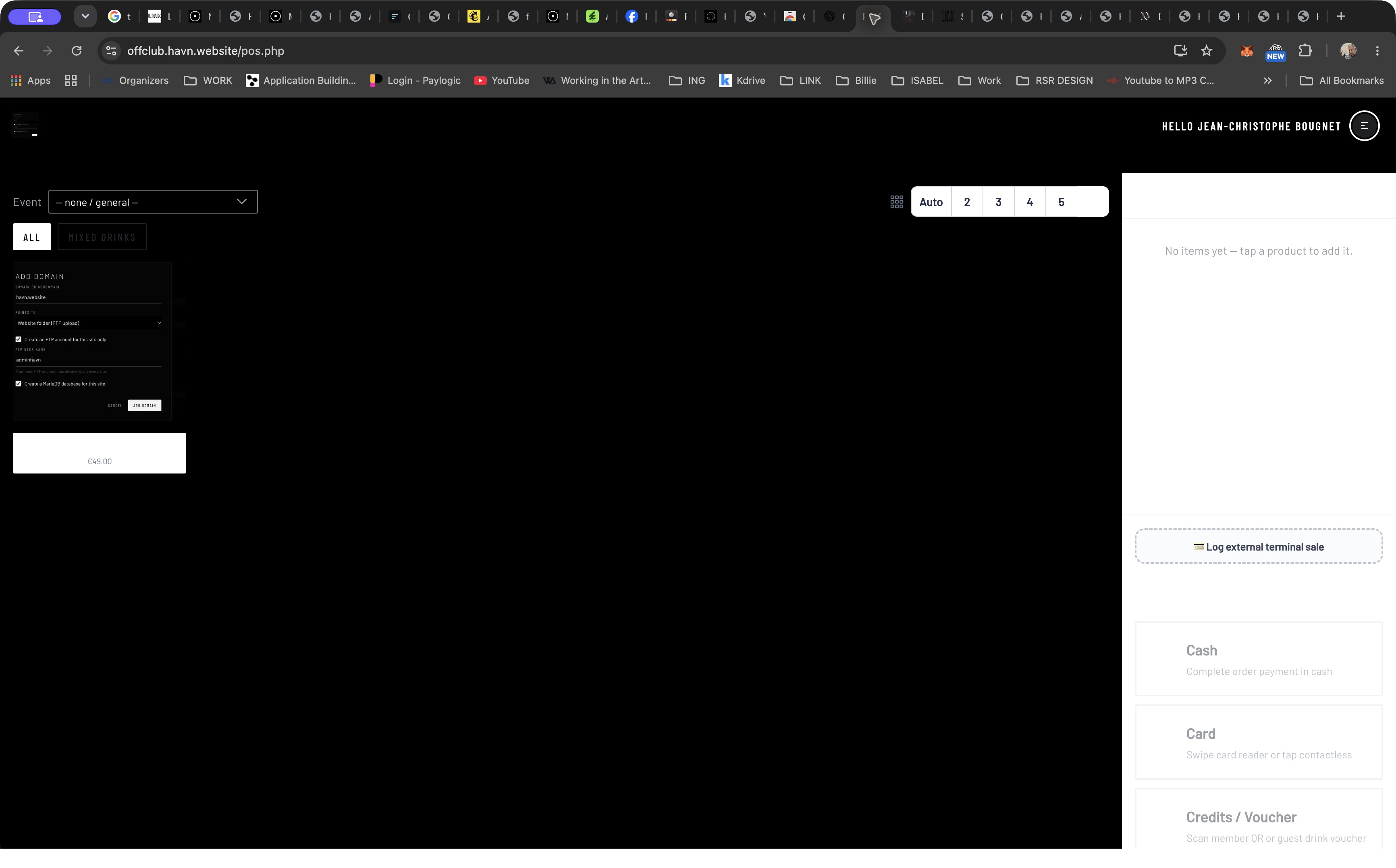
  1. Use the overview to review members, presence, scans, revenue and credit.
  2. At the till, choose an event and products for the current order.
  3. Select a cash, card or credit/voucher payment route; managers have separate sales and stock areas.

Why it matters

Give the till a focused selling interface while keeping membership, stock and reporting in the administrative navigation.

Membership, tickets, presence, the till, stock and sales have dedicated places in the venue’s admin workspace.

Get started ↗
Evidence & limits

Dashboard and till inspected. Sales, Products, Stock, Tickets, Staff and kiosk setup are visible destinations.

No sale, payment, refund or scan was executed. The tenant is mostly empty and has a test product. Payment and stock consistency are not established by these captures.

Operations / DIRECTLY INSPECTED

online ticketing

Your event. Your ticket categories. Your door.

Who it’s for

Event promoter, ticket buyer and check-in staff.

Ticketing needs to bridge event presentation, inventory, orders and admission.

The workflow

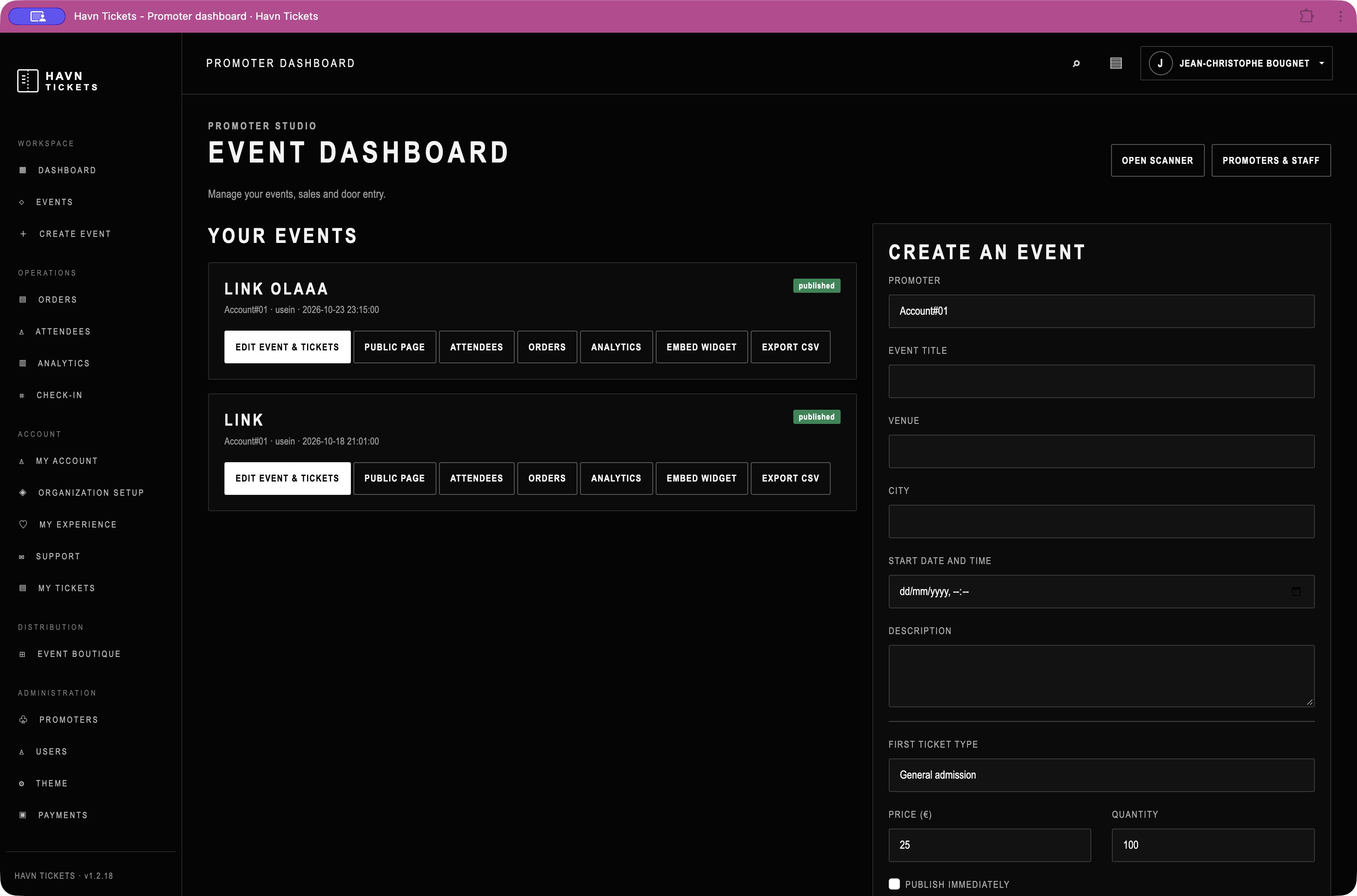
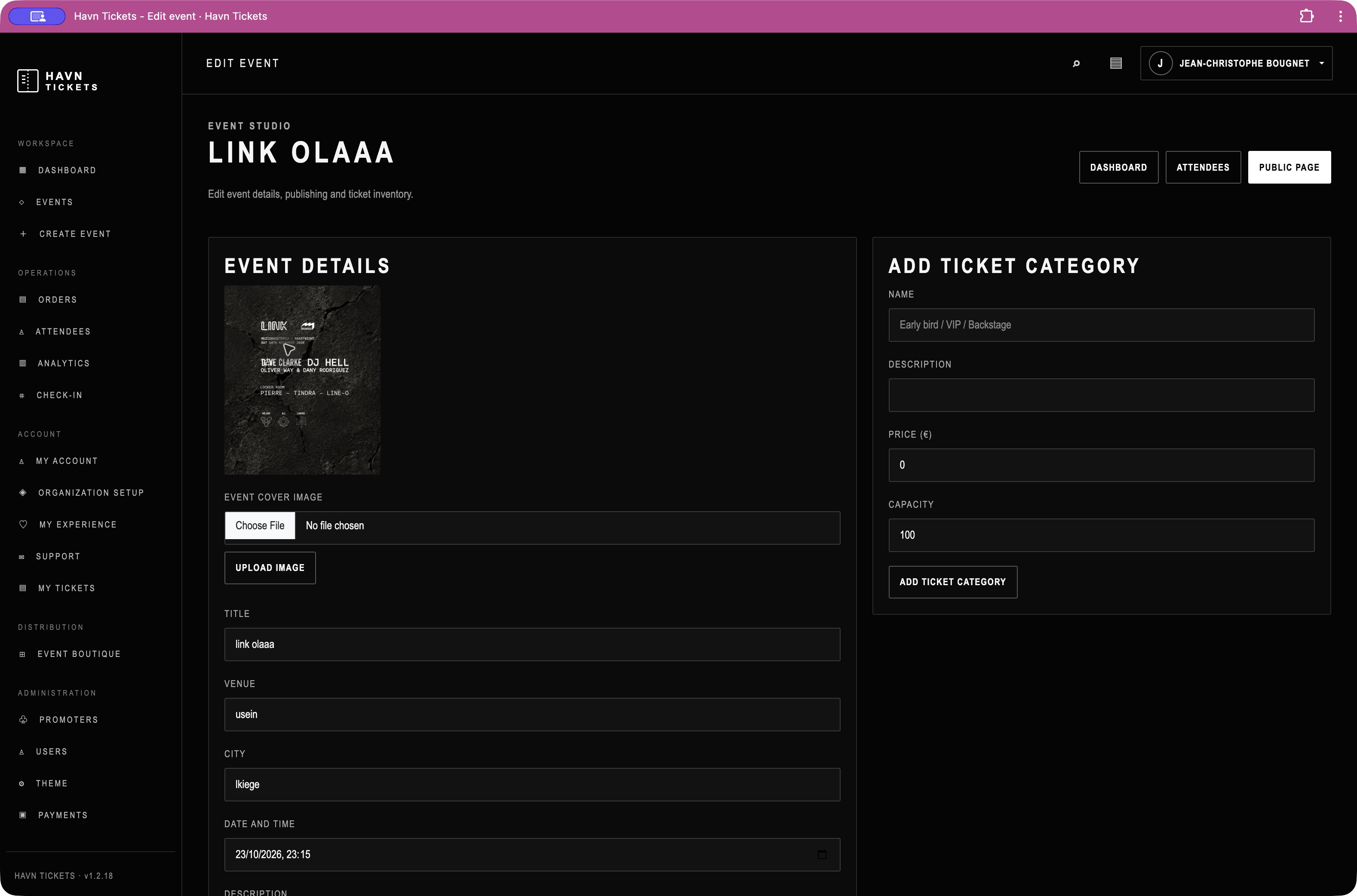
  1. Create or edit an event’s image, place, date and publishing status.
  2. Define ticket categories, prices, capacities and availability.
  3. Use the event workspace to reach public pages, orders, attendees, analytics, embeds and scanner.

Why it matters

Group operational actions around each event, with ticket categories edited alongside event details.

Edit the event and its ticket inventory, then reach orders, attendees, analytics and check-in from the promoter workspace.

Get started ↗
Evidence & limits

Promoter dashboard and an existing event editor inspected, including published events and ticket category controls.

No event saved, ticket purchased, attendee scanned or order exported. Existing event names are retained as captured.

Communication / DIRECTLY INSPECTED

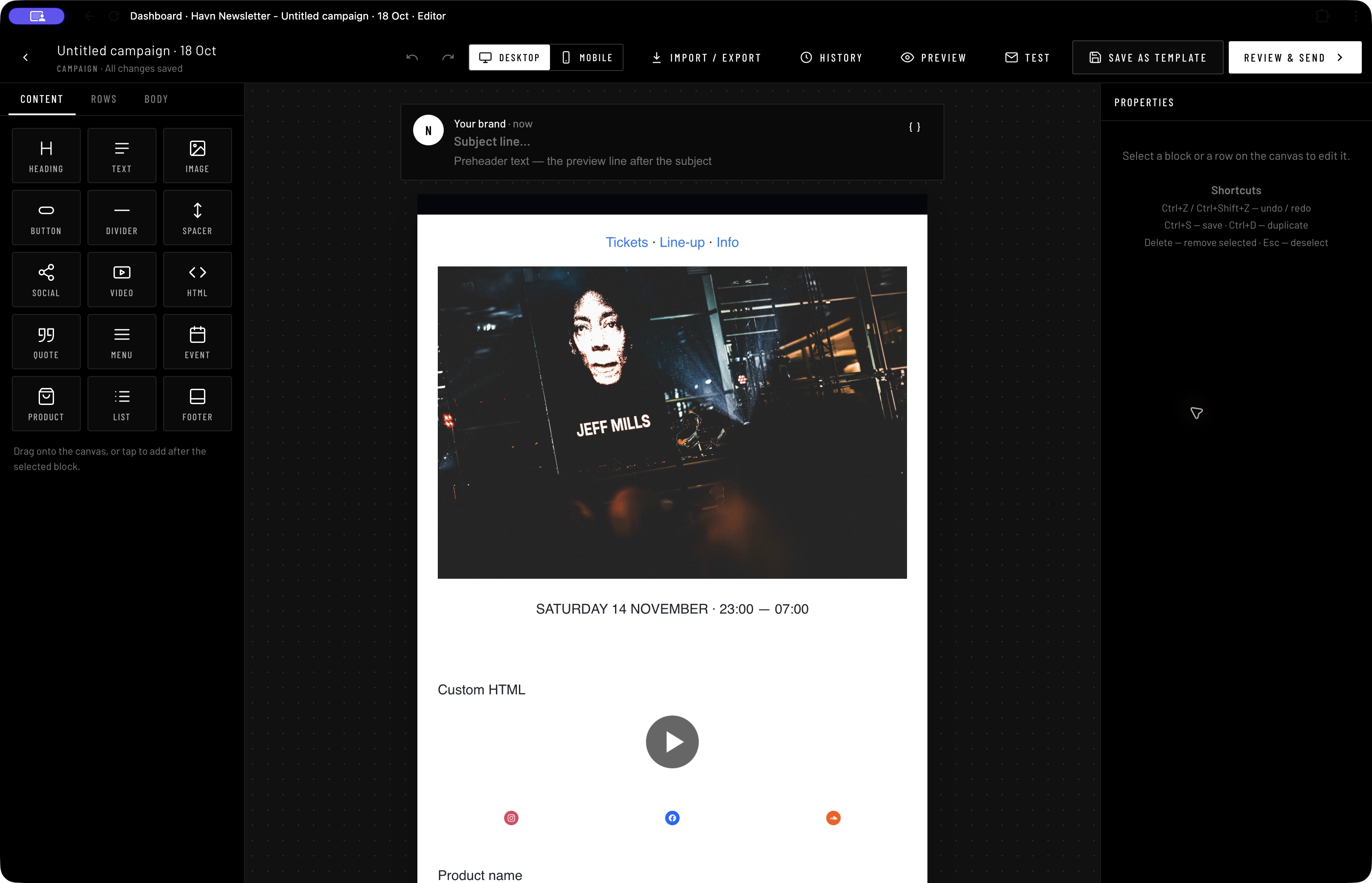
Newsletter Builder & sender

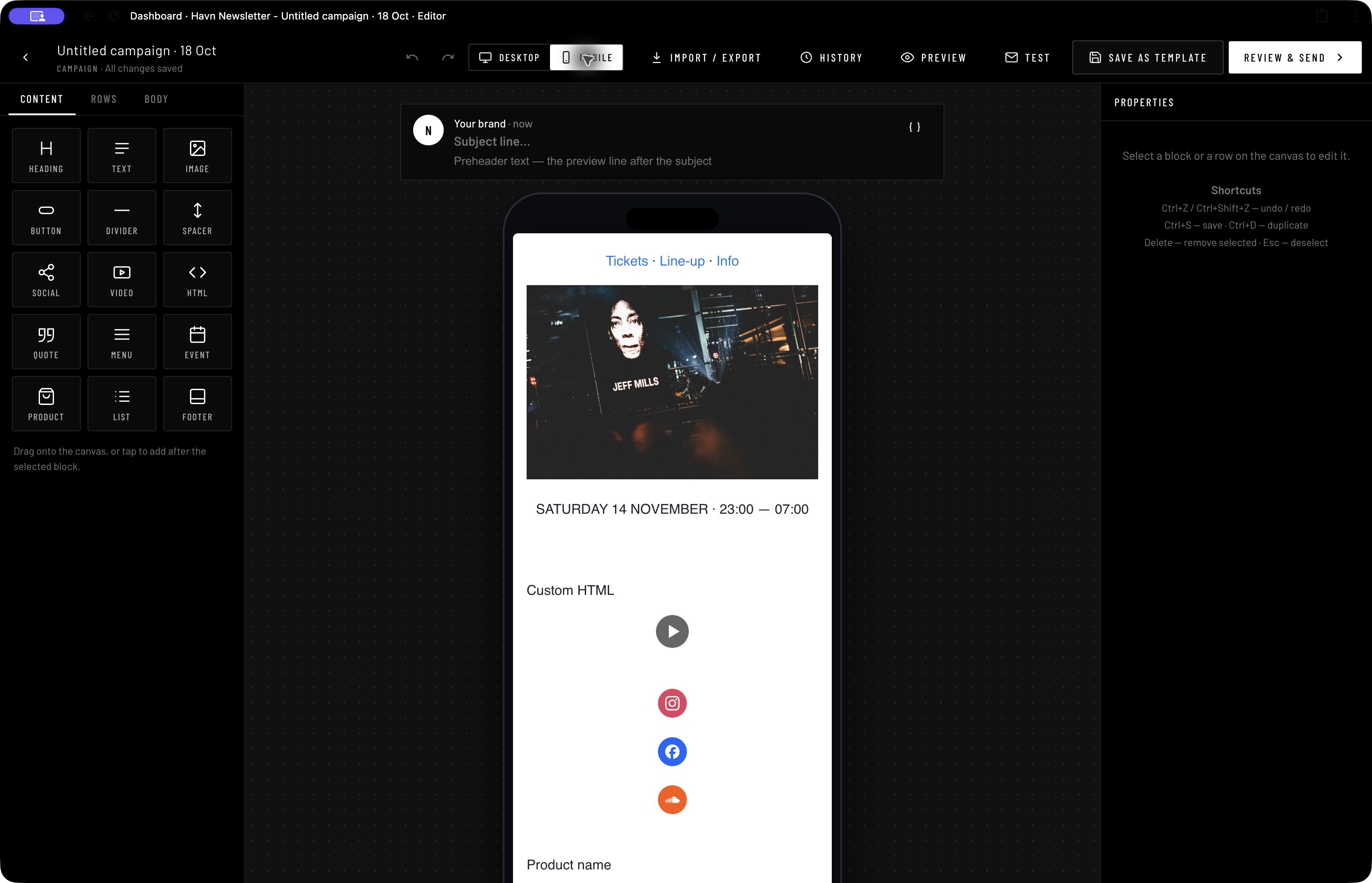
Build the message. Check desktop and mobile.

Who it’s for

Promoter, marketer and newsletter editor.

Visual campaign design, audience organisation and engagement reporting need a coherent workflow.

The workflow

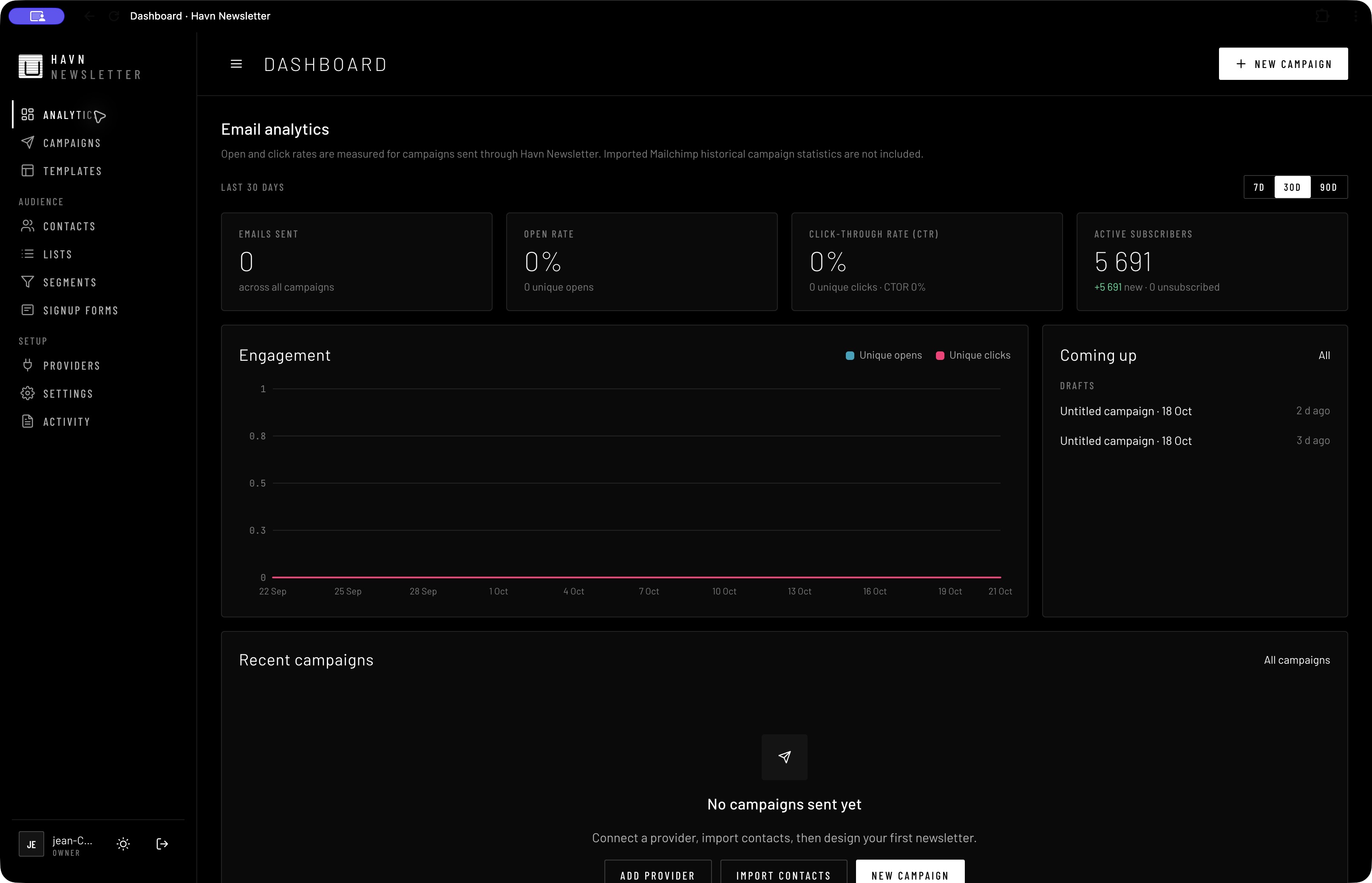
  1. Organise contacts with lists, segments and signup forms.
  2. Compose an existing campaign with content blocks, rows and body styling.
  3. Switch between desktop and mobile modes, then use preview and review controls before sending.

Why it matters

Combine a direct visual editor with device views, campaign history, reusable templates and audience navigation.

Compose with visual blocks, switch desktop and mobile views, and organise the audience with lists and segments.

Get started ↗
Evidence & limits

Analytics and an existing campaign editor inspected in desktop and mobile modes. Blocks include text, image, event, product, video, HTML and footer.

No content edited and no campaign sent. Subscriber totals are displayed records, not evidence of engagement; the dashboard shows no campaigns sent.

Platform / DIRECTLY INSPECTED

Connect / ID

See the person across the apps.

Who it’s for

Organisation administrator and audience manager.

The same person can be a subscriber, crew member, ticket buyer or artist in different systems.

The workflow

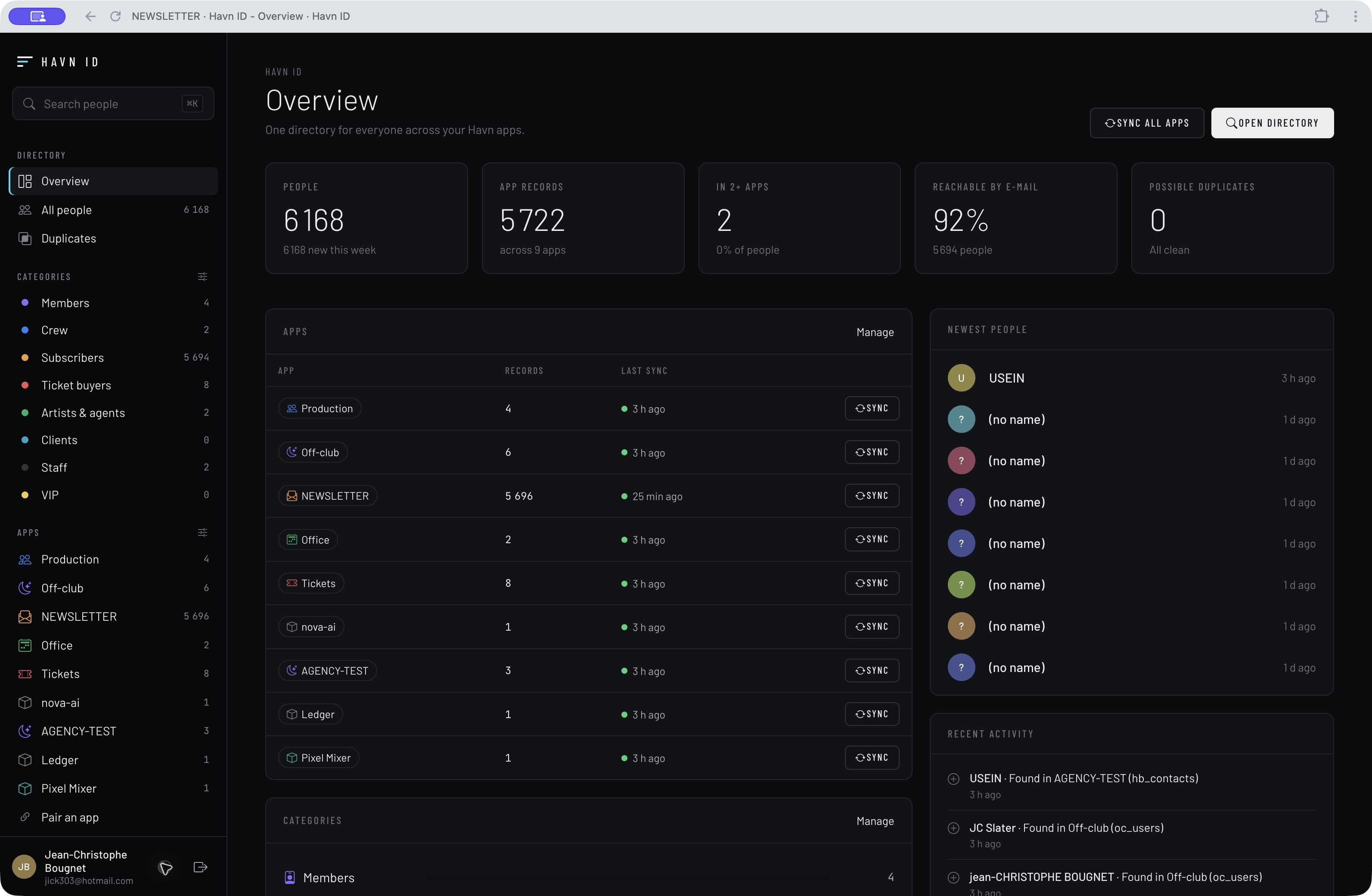
  1. Review the shared directory overview and category breakdown.
  2. Filter people by their app or role in the organisation.
  3. Use the visible connected-app and pairing areas to manage the relationships between systems.

Why it matters

Make people the common reference across apps while exposing source app records and shared audiences.

A shared directory exposes app records, categories, overlapping audiences and duplicate-review tools.

Get started ↗
Evidence & limits

Overview inspected with nine connected-app categories, shared audiences, duplicate review and sync controls.

No synchronisation, merge or pairing was triggered. Counts reflect this screen’s state; identity accuracy and deduplication were not independently verified.

Operations / DIRECTLY INSPECTED

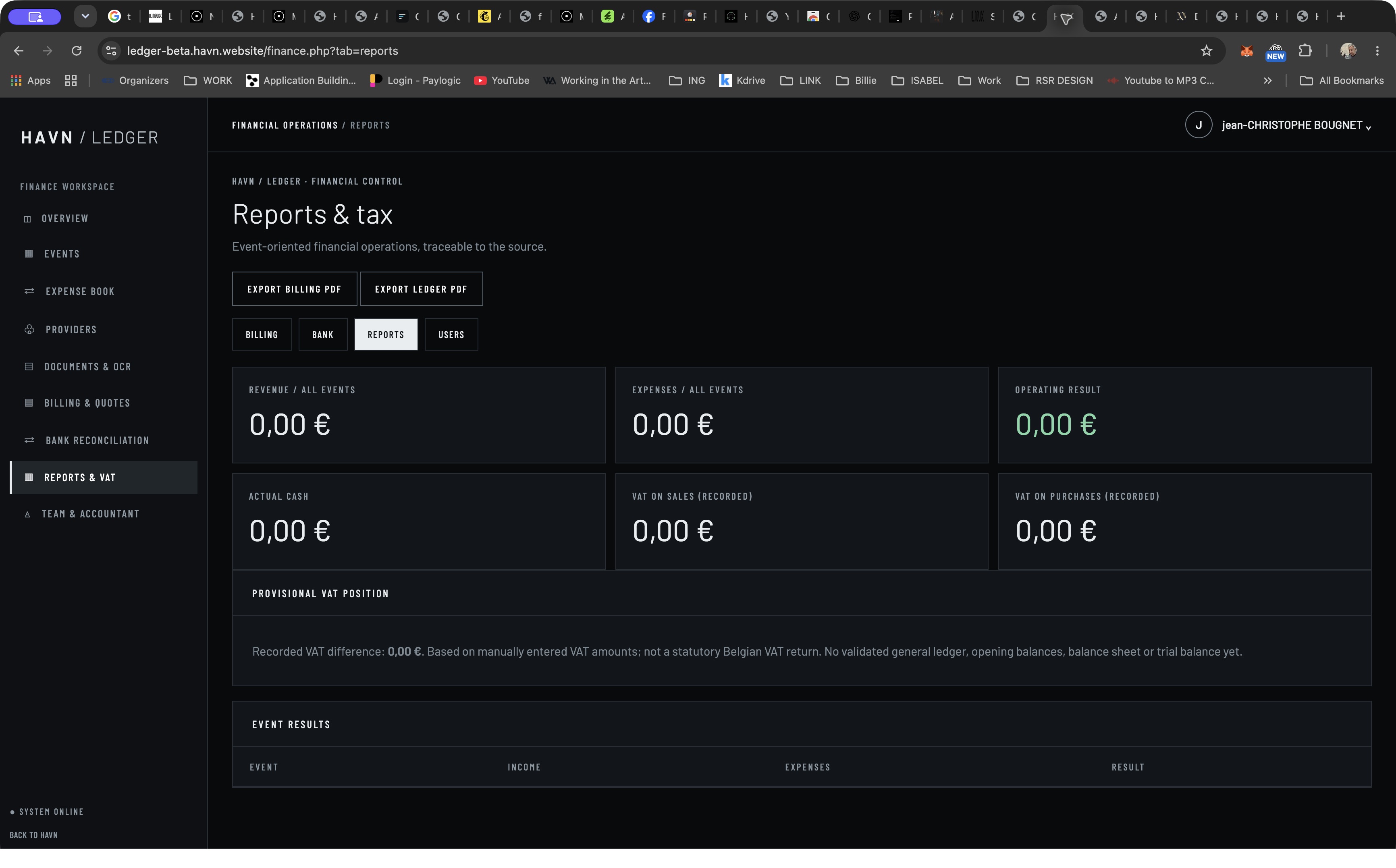
Ledger

Know what is planned. Know what is paid.

Who it’s for

Event producer, business owner and accountant.

A budget, a commitment, a received invoice and an actual payment represent different financial states.

The workflow

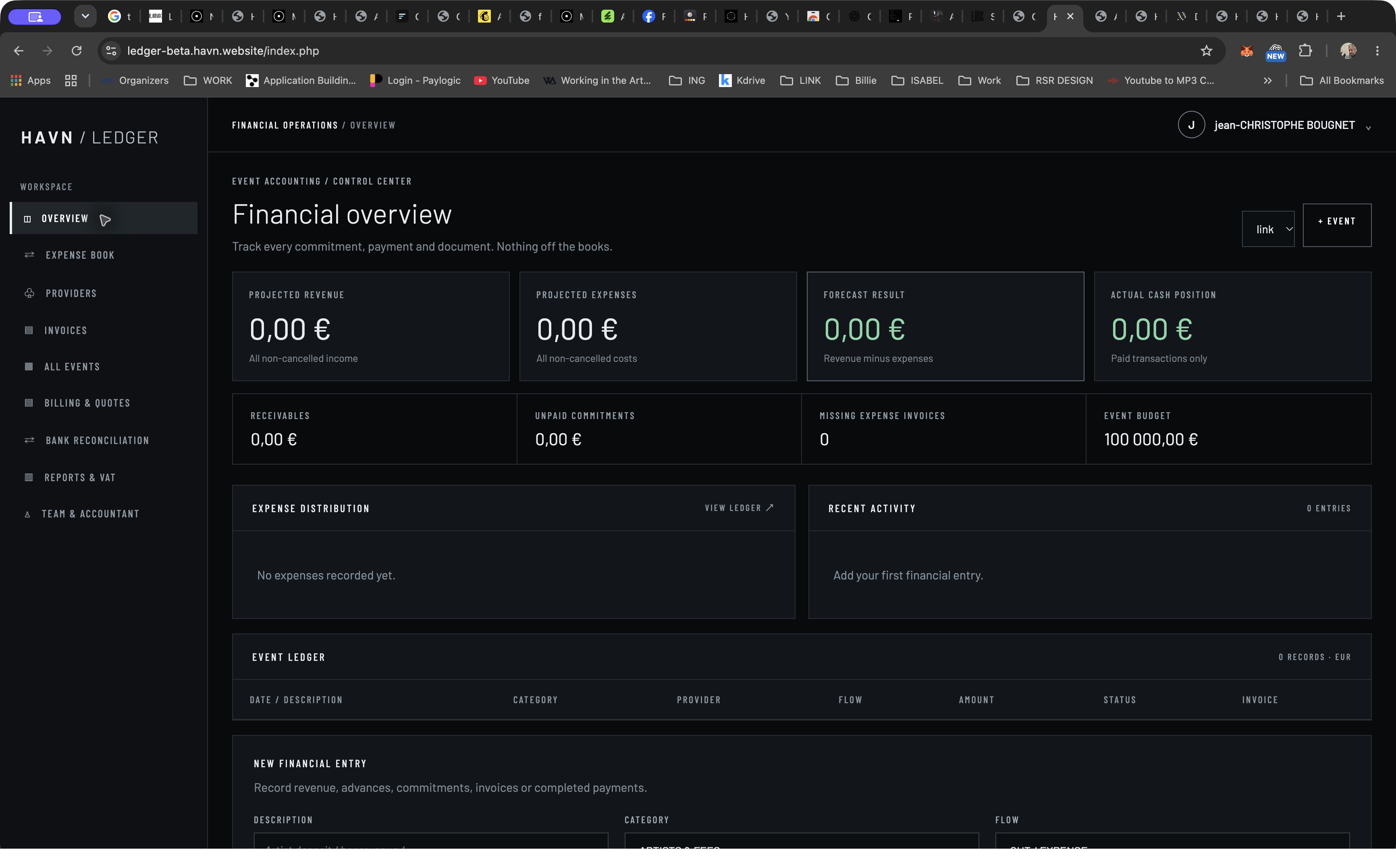
  1. Choose an event and review projected revenue, expenses, cash and commitments.
  2. Use the entry form to associate amount, provider, VAT, status and invoice with an item.
  3. Move to billing, bank reconciliation or reports for the corresponding finance work.

Why it matters

Distinguish the forecast from actual cash and keep supporting documents in the financial workflow.

Event budgets, commitments, actual cash and supporting invoices appear as distinct parts of the financial picture.

Get started ↗
Evidence & limits

Financial overview and Reports & tax inspected; navigation also exposes billing, bank, providers, invoices and team/accountant.

No entries or documents added. The VAT screen explicitly describes a provisional recorded VAT difference and says it is not a statutory Belgian VAT return; this is not proof of a complete accounting system.

Intelligence / DIRECTLY INSPECTED

A.I. Assistant

A place for the day. A workspace for the project.

DARK CAPTURE PENDING · The current Tast Assist build forces light mode and has no theme control. Its two light captures are omitted from this dark edition.

Who it’s for

Individual professional and project owner.

Ideas, people, reminders and project context can become scattered across personal tools.

The workflow

  1. Use the home screen to reach reminders, calendar, people and memory.
  2. Open the workspace and start with a project and its context.
  3. Review the AI connection state before expecting generated work.

Why it matters

Separate personal organisation from a project-oriented workspace, with an explicit readiness message.

Reminders, calendar, people and memory sit alongside a project workspace. AI requires a configured provider.

Get started ↗
Evidence & limits

Home and Workspace inspected. Current workspace says “AI provider not connected.”

No project or reminder created. AI execution in Tast Assist was unavailable at inspection; the separate HAVN AI interface must not be presented as already integrated here. Dark capture pending: this build forces light mode and has no theme control; its two light captures are omitted from the dark edition.

Intelligence / DIRECTLY INSPECTED

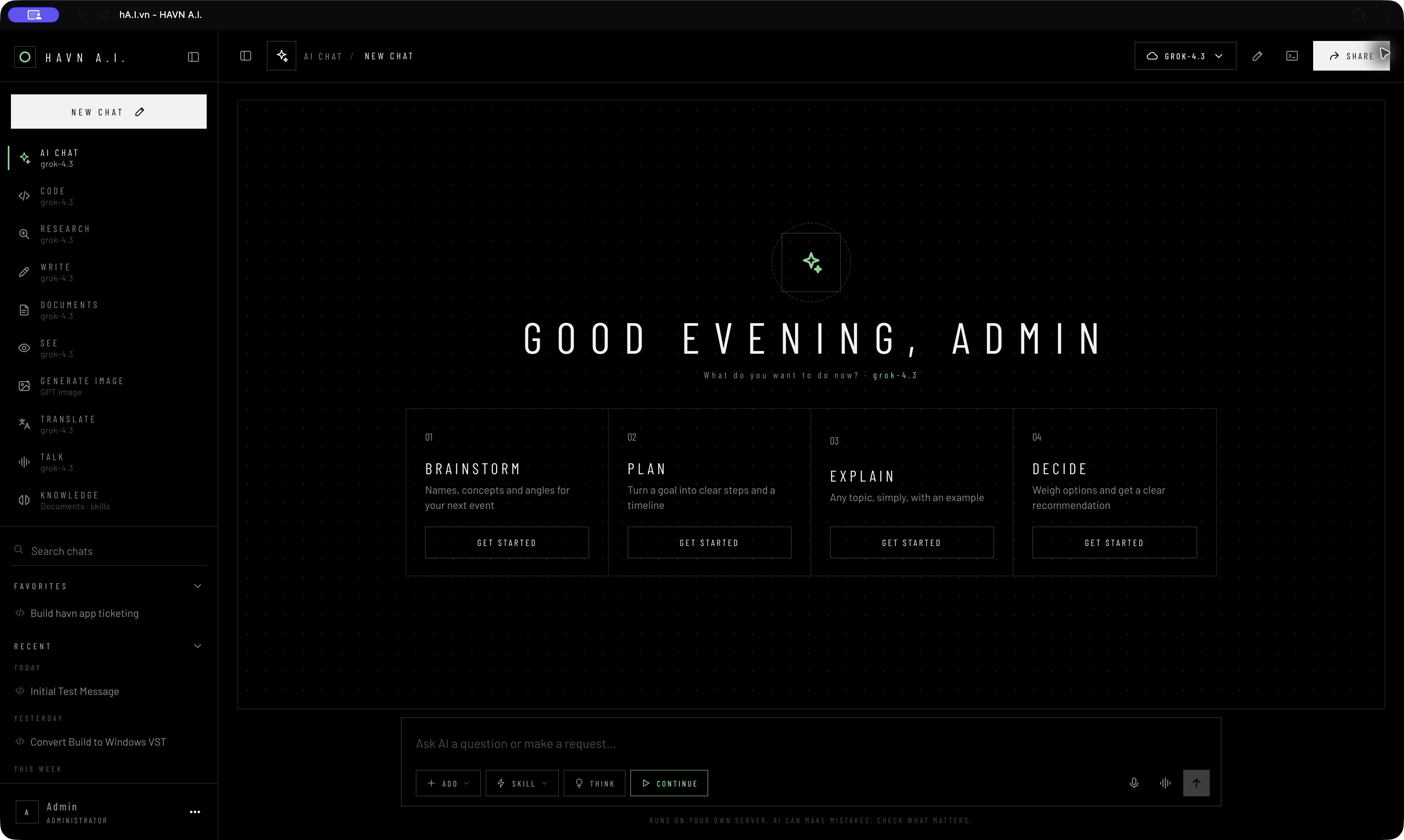
A.I.360 worker

Choose the task. Choose the model.

Who it’s for

Creator, researcher, writer and developer.

Different tasks call for different instructions and model choices, while users need visibility into where work runs.

The workflow

  1. Choose a task mode such as Chat, Code, Research, Write or Documents.
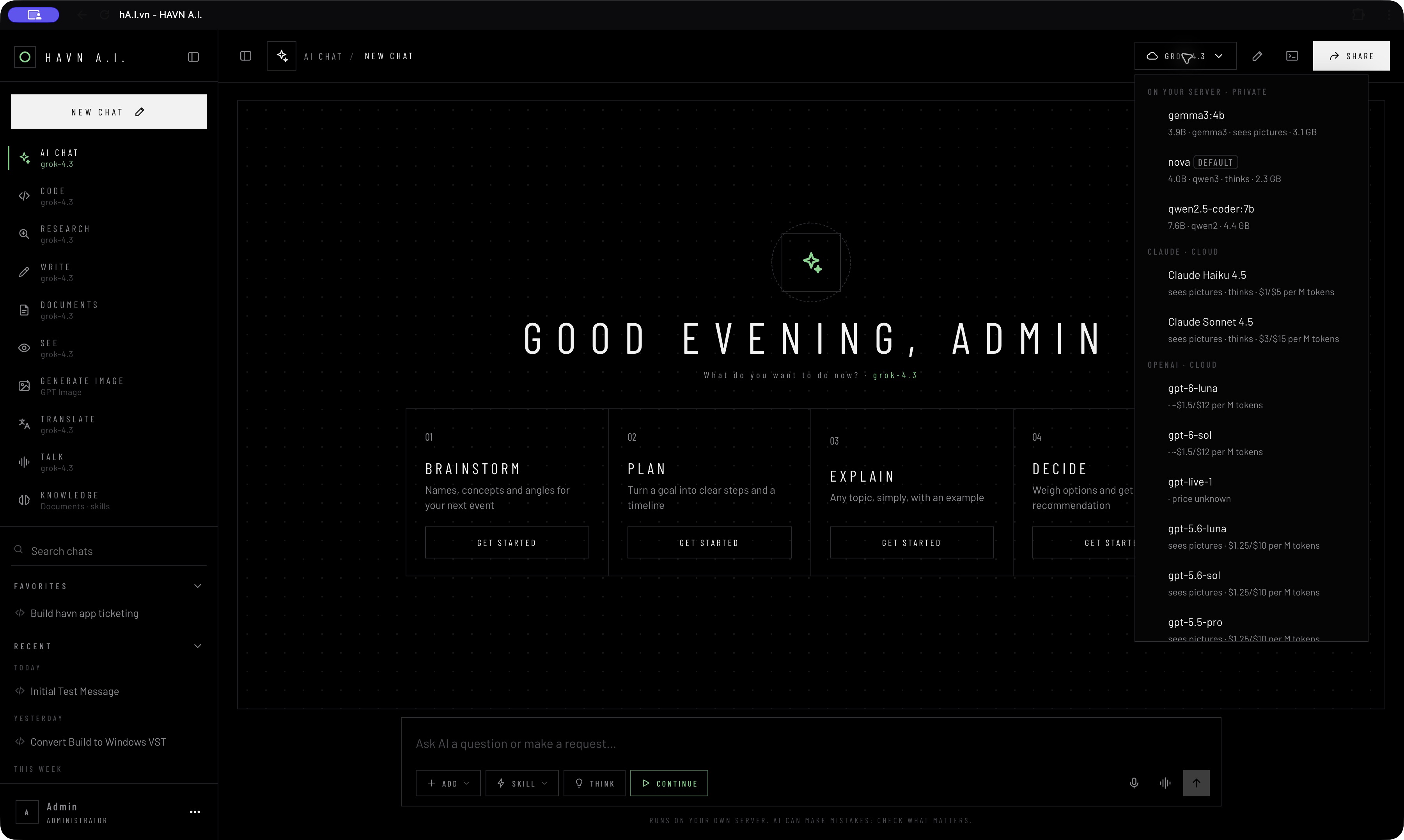
  2. Inspect the model selector’s local-server and cloud groupings.
  3. Use the composer, attachments, skills and task-specific starting prompts.

Why it matters

Put task intent and model choice in the interface, with visible local/cloud distinctions.

Task modes, local and cloud model groupings, attachments and skills are visible in one AI workspace.

Get started ↗
Evidence & limits

AI home, code starting state and model menu inspected. Modes include See, Generate image, Translate, Talk and Knowledge; a terminal panel was also visible.

No generation, command or provider call initiated. Listed models, prices and capabilities are app-displayed options, not independently verified availability or pricing.

Creative / DIRECTLY INSPECTED

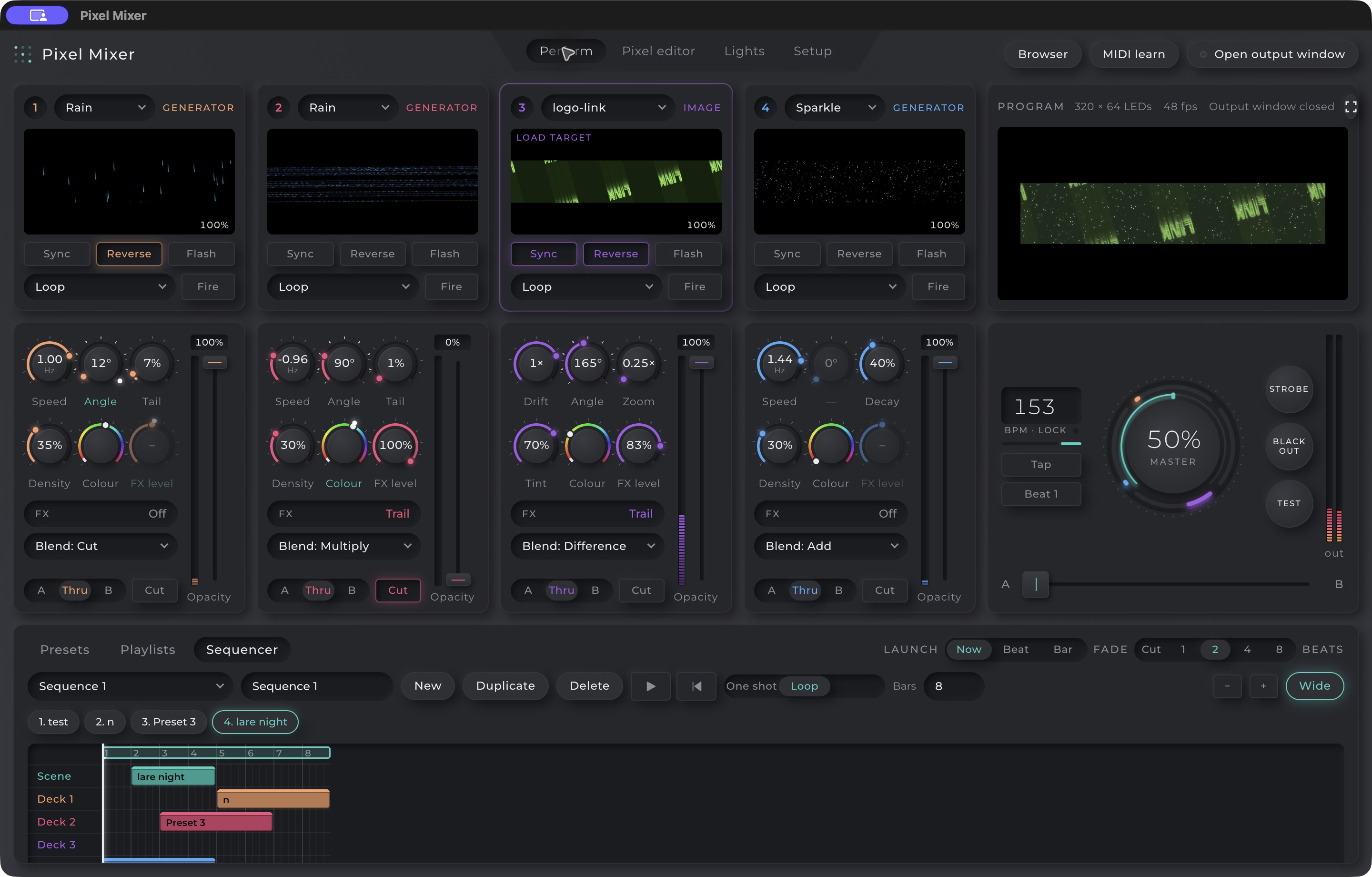
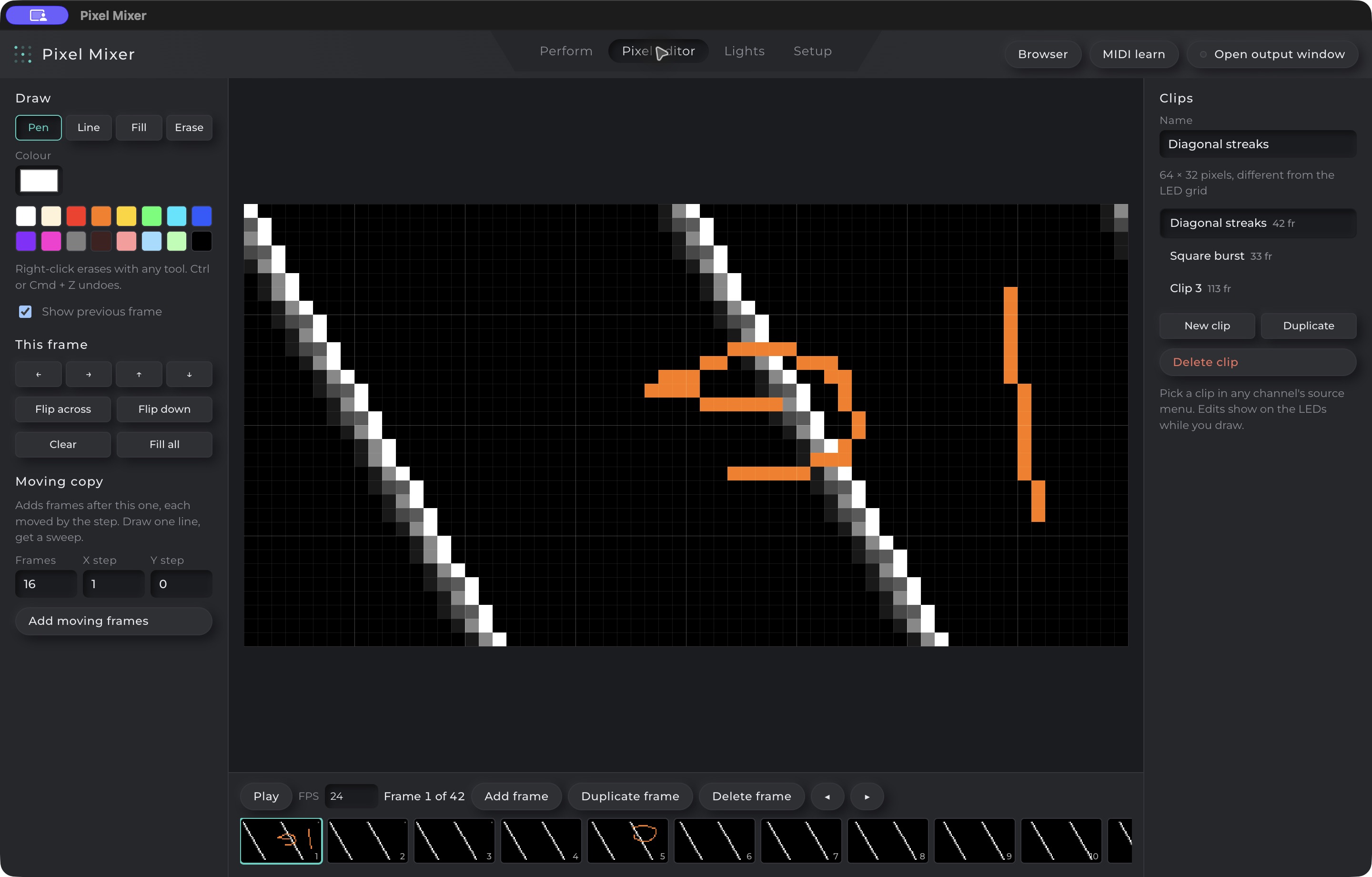
Pixel-Mixer desktop

Mix the visuals. Shape the pixels.

Who it’s for

Visual performer, lighting designer and live-event creator.

Creating visual material and performing it require precise controls, quick feedback and reusable arrangements.

The workflow

  1. Prepare sources across four decks and inspect the program monitor.
  2. Use the mixer’s blend, effect, opacity, tempo and crossfader controls.
  3. Author clips in the pixel editor and organise scenes with presets and the sequencer.

Why it matters

Bring a four-deck performance layout and a frame-based pixel editor into the same desktop tool.

Four source decks, effects, blend modes, a sequencer and a frame-based pixel editor share one desktop workspace.

Get started ↗
Evidence & limits

Existing desktop app opened successfully. Perform and Pixel editor screens captured; existing decks, timeline and pixel frames visible.

No controls, clips or sequences were changed. Physical LED output, MIDI, audio synchronisation and multi-machine behaviour were not tested.

Creative / DIRECTLY INSPECTED

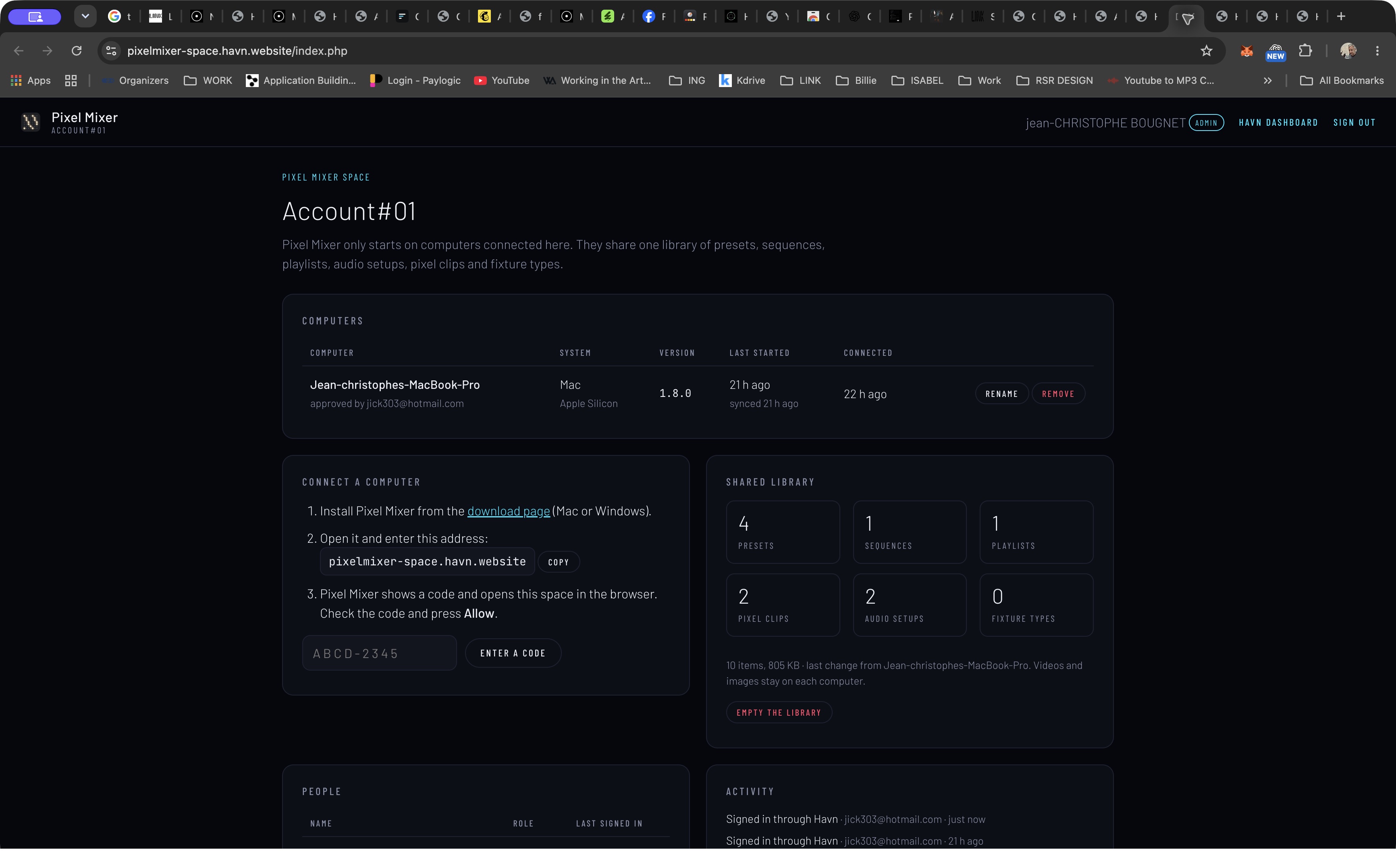
Pixel Mixer library

A shared home for the creative setup.

Who it’s for

Studio administrator and visual production team.

A desktop tool used on multiple machines needs a way to organise computer access and reusable creative assets.

The workflow

  1. Review the computers connected to the organisation’s space.
  2. Follow the visible code-based connection instructions for a computer.
  3. Review the shared library categories and inherited team roles.

Why it matters

Separate desktop performance from web-based computer access and shared-library administration.

Review connected computers, team roles and shared presets, sequences, playlists, pixel clips and audio setups.

Get started ↗
Evidence & limits

Space dashboard inspected with one connected Mac and shared preset, sequence, playlist, clip and audio setup counts.

No computer connected, removed or renamed. No library changed. Synchronisation across two machines was not tested.

Platform / DIRECTLY INSPECTED

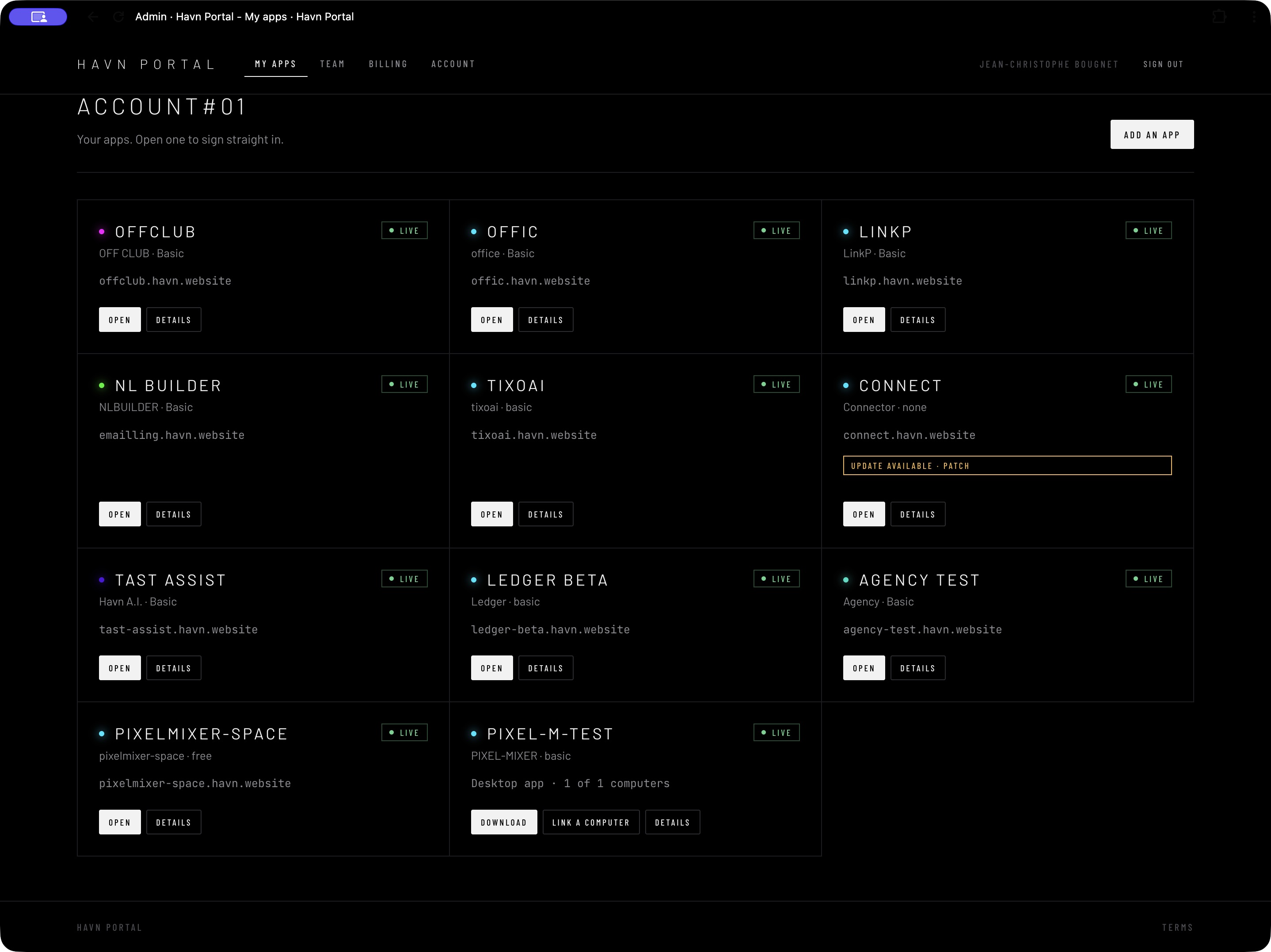
Portal

One account. Your apps within reach.

Who it’s for

Organisation owner, administrator and team member.

A collection of independent apps needs a clear way to handle access, subscriptions and desktop licences.

The workflow

  1. Open My apps to see the organisation’s available products.
  2. Launch a web app through its Open action.
  3. Use Team, Billing and Account destinations or manage the desktop download/linking entry.

Why it matters

Present the ecosystem as a set of app cards with consistent access actions and a distinct desktop route.

App cards provide launch actions, with separate routes for team, account, billing and desktop access.

Get started ↗
Evidence & limits

Signed-in My apps inspected with 11 entries. Open actions reached operational apps. Available-plan dropdown inspected without subscribing.

Billing, purchases, permissions and team changes were not exercised. An Open action reaching an app is evidence of that navigation, not a full authentication audit.

Platform / DIRECTLY INSPECTED

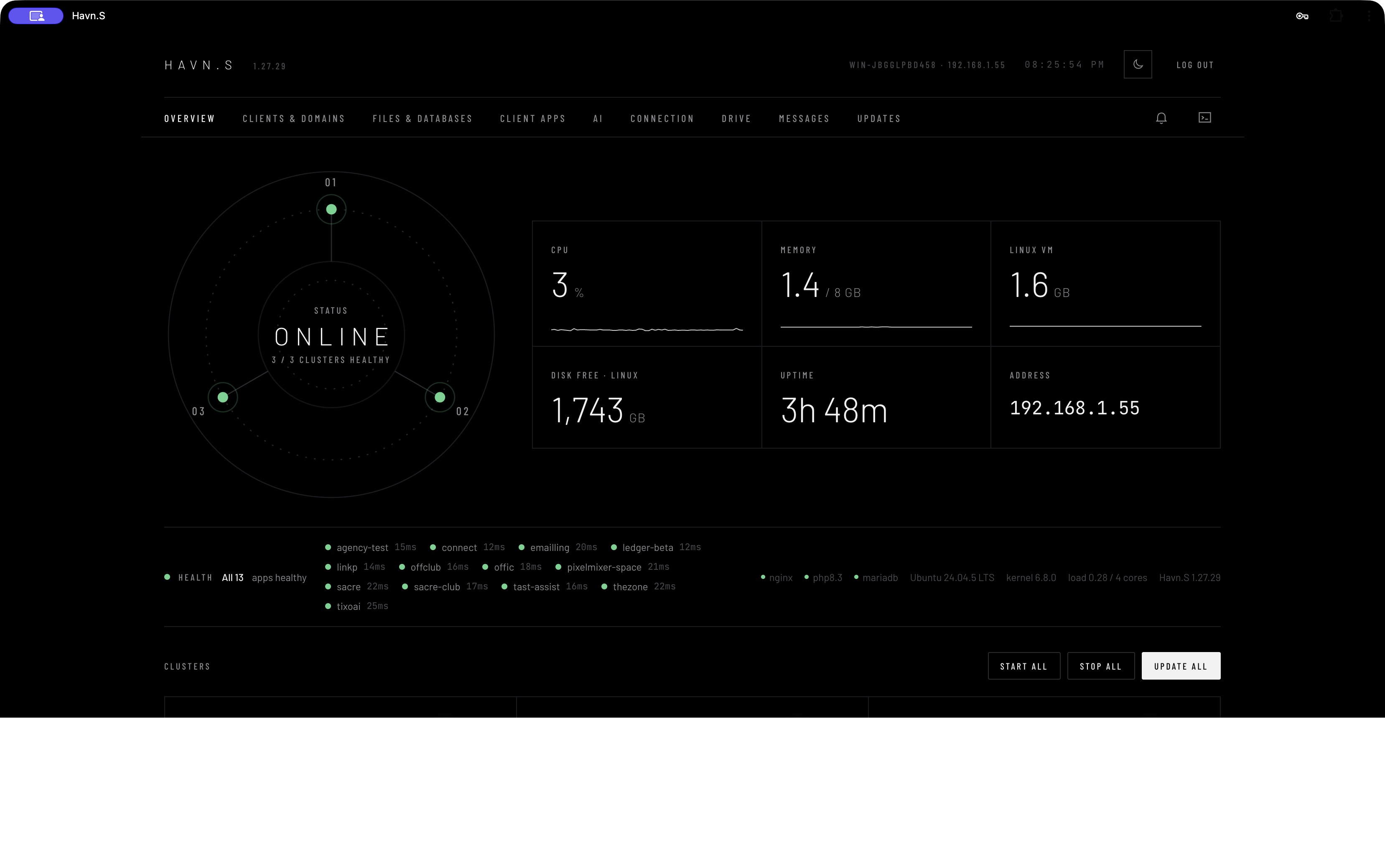
Server

The platform behind the products.

Who it’s for

Platform operator and release administrator.

Running several applications also requires visibility into instances, resources, versions and releases.

The workflow

  1. Review cluster status, resource indicators and app health from Overview.
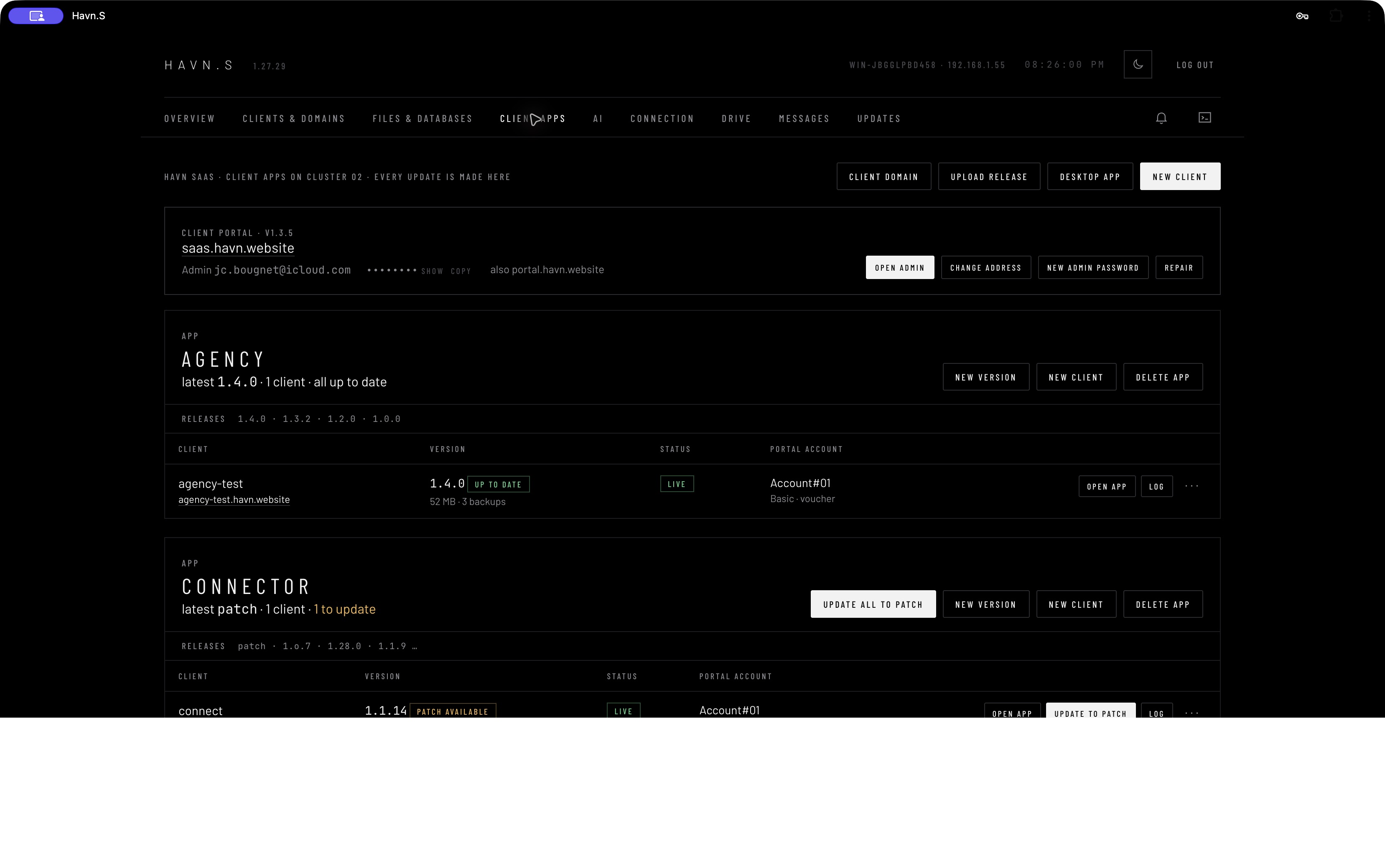
  2. Use Client apps to inspect app families, instances, versions and available releases.
  3. Reach deployment, backup and update controls from the same operational environment.

Why it matters

Include hosting and release operations in the product vision, rather than leaving the delivery layer invisible.

Cluster health, hosted instances, releases, backups and update controls are visible in the operator dashboard.

Get started ↗
Evidence & limits

Overview and Client apps inspected. Overview listed 13 hosted instances across nine app types; desktop installer/licence administration was also visible.

No update, repair, backup, restart or infrastructure change executed. Health checks and displayed versions are observations, not load tests, uptime guarantees or reconciled release truth.

Platform / DIRECTLY INSPECTED

Drive

Keep the material close to the work.

Who it’s for

Platform operator and team member.

Creative assets and release material need a discoverable place to live alongside the apps that use them.

The workflow

  1. Open Drive from Havn.S.
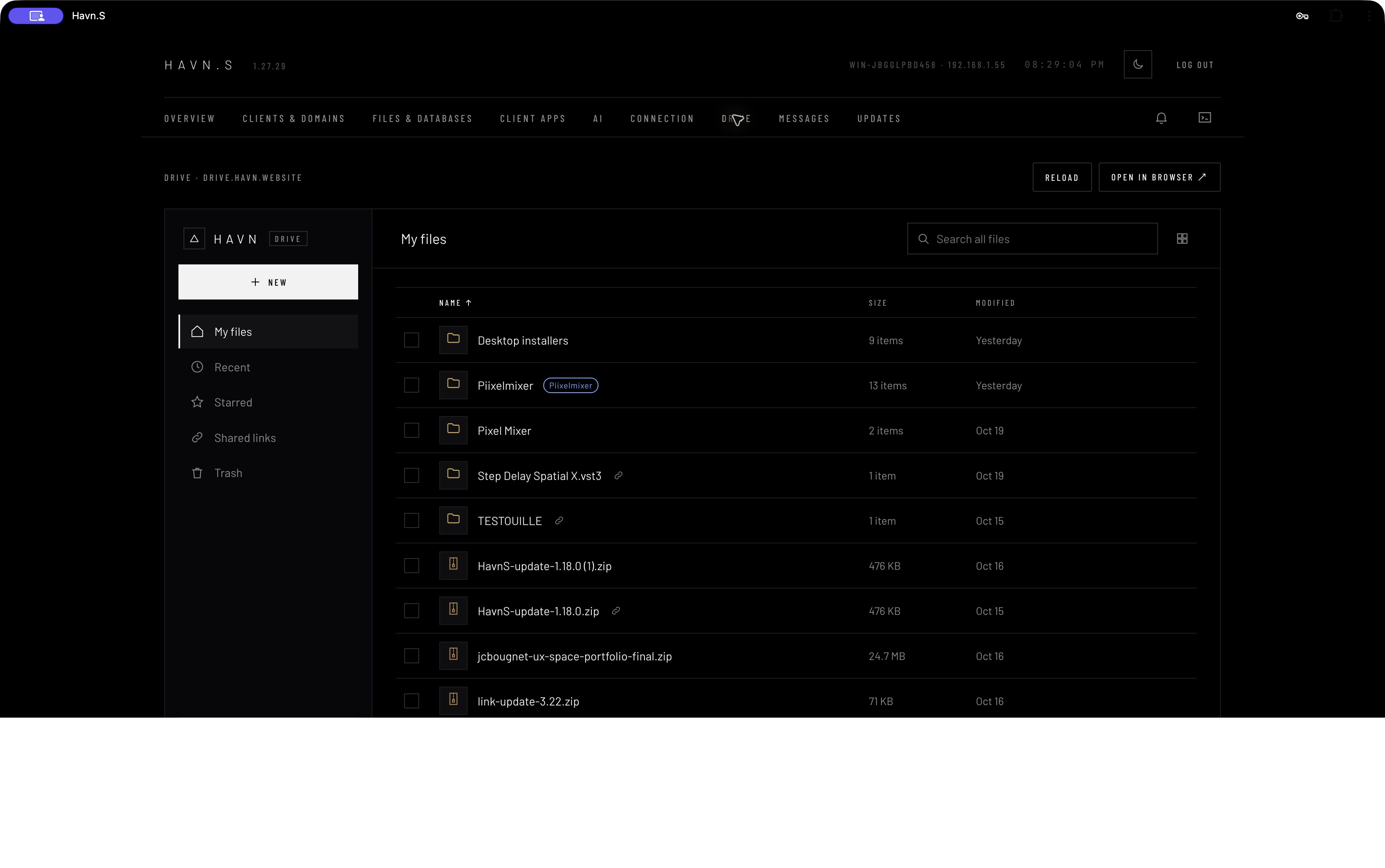
  2. Browse files using search, sorting and list/grid controls.
  3. Use the visible Recent, Starred, Shared links and Trash destinations when managing material.

Why it matters

Offer familiar file navigation within the broader platform, alongside visible WebDAV settings.

Searchable file browsing includes recent files, starred items, shared links and trash, inside the HAVN environment.

Get started ↗
Evidence & limits

Embedded Drive opened successfully and displayed folders, downloads, sharing actions and storage information.

No file opened, shared, uploaded, deleted or downloaded. Storage durability, sharing permissions and WebDAV operation were not tested.

Public scope / PUBLIC DESCRIPTION

Hospitality 

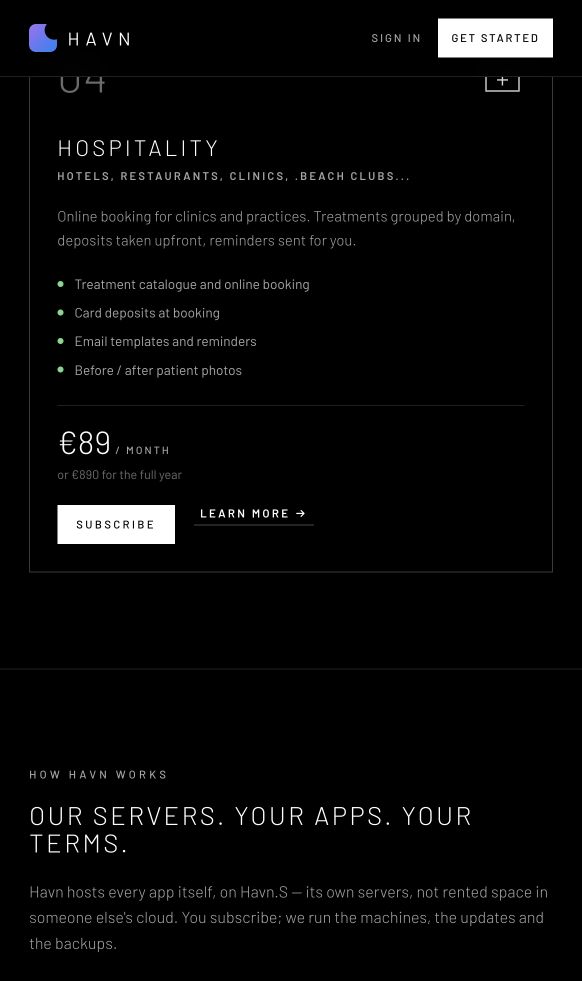
Appointment-based services, in the public product range (clinics, restaurant, hotel...).

Who it’s for

Clinic operator and person booking a treatment.

Treatment selection, appointment booking, deposits and reminders need to form a coherent service journey.

The workflow

  1. Browse treatments grouped by domain.
  2. Book a treatment and follow the deposit flow.
  3. Receive reminders while staff manage the appointment context.

Why it matters

Extend the service-operations idea beyond events to appointment-based businesses.

The public site describes treatments, appointments, deposits and reminders. A live Medical app was not inspected.

Get started ↗
Evidence & limits

Public HAVN product card lists treatments, online booking, deposits, reminders and before/after patient photos.

No live Medical tenant was found in the inspected account, server list or subscription catalogue. This is public-site scope only, not a verified application walkthrough. No patient records accessed.

Coming soon   Havn app Builder

Your workflow.
One custom build.

A planned way to bring selected capabilities from the HAVN ecosystem into one app, shaped around your organisation and its identity. Join the waitlist to discuss what you need.

  • Explore capabilities across the full HAVN app family
  • The goal: one focused workspace, hosted by HAVN
  • Your organisation, your workflow, your visual identity
  • Coming soon — scope and availability to be confirmed
The HAVN ecosystem
  • Agency
  • Office / MTS
  • Production
  • OFF CLUB
  • Tickets / TixoAI
  • Newsletter
  • Connect / ID
  • Ledger
  • Tast Assist
  • HAVN AI
  • PixelMixer
  • PixelMixer Space
  • Portal
  • Havn.S
  • Drive
  • Medical*

*Medical is public-scope only. This map shows the ecosystem; Build compatibility and feature scope remain to be confirmed.

Evidence & limits

The public website explicitly labels HAVN Build “Coming soon.”

Roadmap concept only. No custom build configuration, compilation or deployed result was observed.

Your next move

Put HAVN to work.

Explore the tools with us. Choose the apps your operation needs.

Get started ↗
Full original app screenshot